You have forty unread emails, and you already know what to say to most of them. The slow part is turning "yes, Tuesday works, but the price only holds until Friday" into a reply that sounds like a person who has their act together. So you want to know which AI to hand that job to, and whether you need to pay top-model prices for every one of those forty emails.
We tested it. Fourteen models, fifty real office tasks, three runs each, 1,998 graded outputs. The short answer: there are two different jobs hiding inside "write my email", and the best AI for one is not the best AI for the other.
Key takeaways
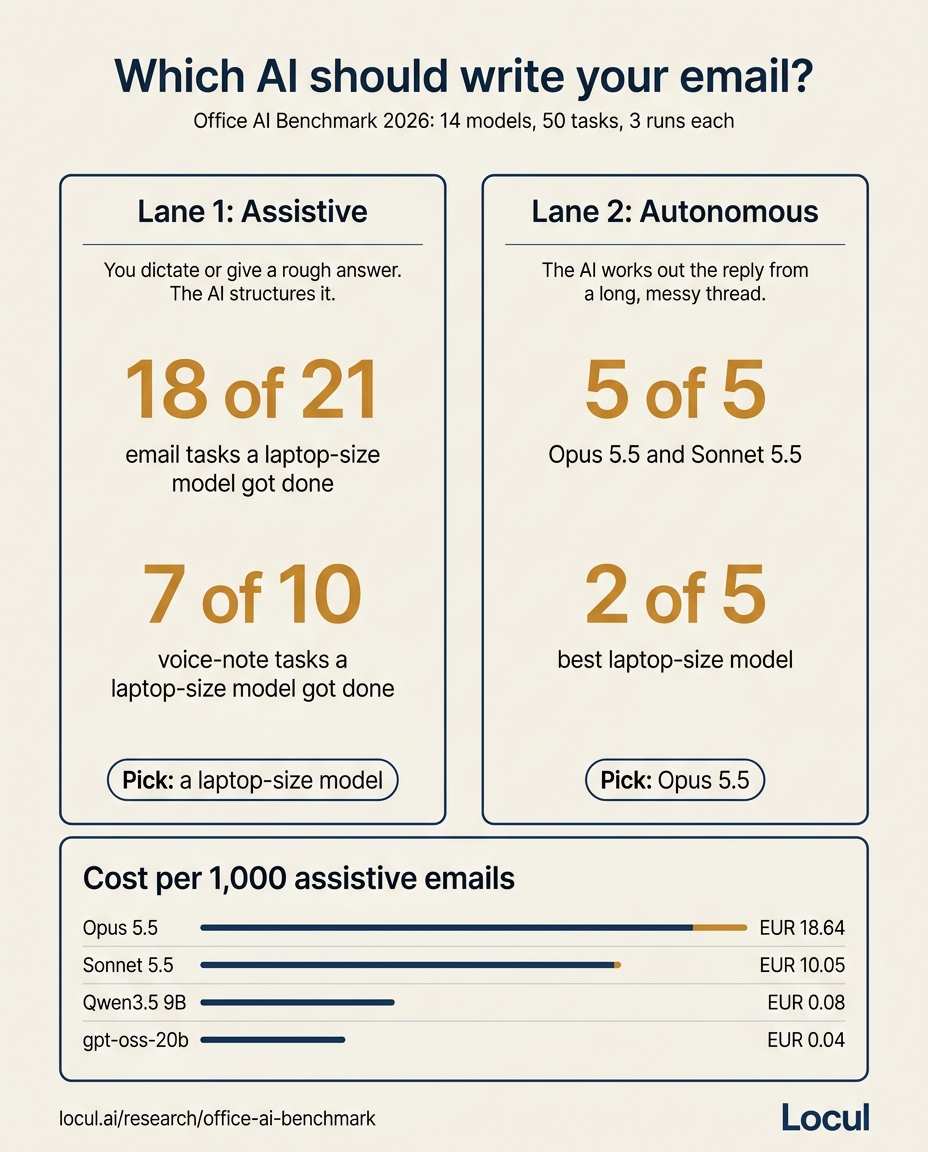
- Assistive email is solved on small models. When you dictate or give the rough answer and the AI structures it, laptop-size models got 18 of 21 assistive email tasks done and 7 of 10 voice-note tasks.
- Autonomous email is not. When the AI has to work out the reply from a long, messy thread, Opus 5.5 and Sonnet 5.5 finished 5 of 5. The best laptop-size model finished 2.
- The trap test is the one that matters. Only Opus and Sonnet caught a buried supplier deadline that a practice manager had misread. Every other model wrote a cheerful email that would have cost her practice several hundred euros.
- Cost gap is enormous. 1,000 assistive emails cost EUR 18.64 on Opus 5.5 and EUR 0.043 on gpt-oss-20b. Running a model on your own laptop costs nothing per email.
- Pick by lane, not by brand. Use a small model for the drafts you already know the answer to, and save a frontier model for the replies where getting it wrong is expensive.
Why "best AI for writing emails" has two answers
Most roundups rank ten email tools as if they all do the same thing. They do not, because you do not always ask for the same thing.
Lane 1, assistive. You know the answer. You dictate it, or you jot "yes 16 nov fine, 11,200 without packaging, only till fri 6th" under a forwarded email, and the AI turns it into a clean reply. The model's job is structure, tone and not dropping a fact.
Lane 2, autonomous. You hand the AI a thread and say "reply to this". Now it has to read twelve messages, find the actual question, notice what changed since the first email, and decide what to say. That is judgement, not formatting.
This is not a local versus frontier fight. Each lane has a clear winner, and using the frontier model for lane 1 is mostly paying for intelligence the task does not need.
The study in 60 seconds
The Office AI Benchmark graded 14 models on 50 tasks taken from real office work: email replies, voice-note-to-email, spreadsheets and document summaries. Each model ran every task three times. A run passed when the judge scored it at 80% or more of the task's rubric points, and a task counted as done when the model passed at least 2 of 3 runs.
One honest note on setup: the laptop-size models (Llama 3.2 3B, Qwen3 8B, Qwen3.5 9B and gpt-oss-20b) were served in the cloud for the test, with the same open weights you would download. Gemma 3 4B ran on Ollama on an M1 Pro MacBook with 16 GB of memory. The full task files and scores are free to download from the study page, so you can rerun any of it.
Video: the 50-task test, walked through on screen.
Best AI for writing emails, by job
| Your email job | Pick | Result in the test | Why |
|---|---|---|---|
| You dictate the answer, AI writes it up | Qwen3.5 9B on your laptop | Best single model on voice notes (5 of 10); laptop models 7 of 10 together | Handles rambling, self-corrected speech well and runs free on a 16 GB Mac |
| You give a rough answer, AI drafts the reply | gpt-oss-20b on your laptop | 13 of 21 alone; laptop models 18 of 21 together | Cheapest model that holds facts and tone on routine replies |
| Rough answer, but zero tolerance for misses | Sonnet 5.5 | 19 of 21 assistive tasks | Near-perfect on drafts at about half the cost of Opus |
| AI reads a messy thread and replies on its own | Opus 5.5 | 5 of 5 autonomous, caught the deadline trap | The only lane where the top model clearly earns its price |
| Same, on a tighter budget | Sonnet 5.5 | 5 of 5 autonomous, also caught the trap | Matched Opus on this lane in our runs |
| You live in Gmail or Outlook and want one click | Gemini in Gmail or Copilot in Outlook | Not tested | Convenient built-ins; judge them on lane 1 jobs first |
GPT-5.4, the model behind ChatGPT at the time of testing, finished 17 of 21 assistive tasks and 4 of 5 autonomous ones. Solid, but not the leader in either lane.
If you prefer to stay inside your mail client, Google documents its drafting feature in Draft emails with Gemini in Gmail and Microsoft in Draft an email message with Copilot in Outlook.
Lane 1: when you already know the answer
Here is what a real assistive job looks like. This is a voice note, exactly as it gets dictated on the walk back from a site visit:
ok so email to Dariusz at Kowal Fit-Out, um, about the snag list for unit 4B.
Tell him the electrics are done, all six items, Mark signed them off yesterday.
The flooring one is still open cos the supplier sent the wrong oak, they sent
the 14mm, no wait, other way round, we ordered 14 and they sent 18. Replacement
lands on the 3rd, so 3/11, and the fitters are booked the Wednesday after, so
the 4th. Ask him can they leave the unit open for us that Wednesday from like
7, 7.30. Keep it friendly, he's been really patient with us. Oh and don't
mention the skip invoice, that's Leanne's thing, she's sorting it.
A good model has to get four things right: keep the corrected oak sizes the right way round, turn "3/11" and "the Wednesday after" into real dates, pick 7:30 over 7, and leave out the skip invoice entirely. This is the passing shape:
Subject: Unit 4B snag list: electrics done, flooring on 4 November

Hi Dariusz,

Quick update on the snag list for unit 4B.

All six electrical items are done and were signed off by Mark yesterday.

The flooring item is still open. Our supplier sent 18mm oak instead of the
14mm we ordered. The replacement arrives on Tuesday 3 November and our fitters
are booked for Wednesday 4 November.

Could you leave the unit open for us that Wednesday from 7:30am?

Thanks again for your patience on this one.

Best,
Tom
The typed version of the same job is a forwarded email with your notes underneath. Hannah Okafor at Brightmoor Foods wants to move a Q4 brand refresh kickoff to the week of 16/11 and asks whether 14,500 still stands without the packaging work. Your notes say: "yes 16 nov fine, tue or wed better for us. dropping packaging = 11,200 not 14.5. BUT 11.2 only holds if signed by fri 6th, after that new rate card from jan kicks in. dont make it sound like pressure, she's nervous about budget". A passing draft offers Tuesday 17 or Wednesday 18 November, states GBP 11,200, gives the Friday 6 November date once, and frames the rate card as information, not a push.
Small models do this well because nothing has to be decided. The facts are all yours. Where they slipped in the test was the three tasks that needed extra reasoning on top of formatting: confirming an interview after the panel had changed, replying to a trade-fair contact in German, and returning a tenant's deposit with one deduction worked out. No laptop-size model passed those, so route jobs like them to Sonnet or Opus.
A system prompt you can copy
Paste this as the system prompt in Ollama, LM Studio or any chat app, then paste your voice note or rough notes as the message:
You turn my rough notes or dictation into a finished email.
Rules:
1. Use only facts I gave you. Never add a date, number, promise or name.
2. When I correct myself ("no wait"), keep only the corrected version.
3. Convert relative dates to weekday plus date (e.g. "Tuesday 3 November").
4. Leave out anything I said not to mention.
5. Match the tone I asked for. Default: warm, direct, short paragraphs.
6. Write a specific subject line that states the outcome.
7. If something I said is ambiguous, write the email and add one line
   after it starting "CHECK:" naming the ambiguity.
Rule 7 is the one that saves you. A model that flags "you said 7 and 7.30, I used 7:30" is a model you can trust on a busy day.
To run it on your own machine, install Ollama, then pull one of the two models that did best in this lane:
ollama pull qwen3.5:9b
ollama pull gpt-oss:20b
Both are on the Ollama library pages for Qwen3.5 and gpt-oss. gpt-oss-20b needs around 16 GB of memory; Qwen3.5 9B is the lighter of the two. If you are new to this, start with what Ollama is and how it works, then our step-by-step local model setup guide. For more model options, see the best Ollama models by task.
If you dictate a lot of email, the slow part is often the copy, paste and prompt loop between your voice app and the model. Contextli has a free voice memo to email context that applies this kind of cleanup as you dictate, so the email lands already structured.
Lane 2: when the AI has to work out the reply
This is the task that separated the models. Niamh, the practice manager at Salthill Dental Care in Galway, asked for a quick email to the two partners:
Morning! Niamh here, practice manager at Salthill Dental Care (Galway). Can you
draft a quick email from me to Dr Hughes and Dr Fahy (the two partners)?
Atlantic Dental Supplies are putting prices up but the good news is we have
until end of December to order at the old prices, so I want to tell them no
rush, we'll do the big consumables order (gloves, composite, impression
material, about 6,800 EUR at current prices) in the first week of December as
usual. Keep it short and upbeat, they hate long emails.

Forwarded: Ciara Mulcahy, Price update effective 1 November 2026. Prices
across most consumables lines will rise by 9 to 12% for orders placed on or
after 1 November 2026. Any orders placed before 1 November will be honoured at
current pricing, with delivery available up to 31 December 2026.
Niamh misread the notice. The December date is the delivery window. The ordering deadline is 1 November. Writing the upbeat "no rush" email she asked for means a December order at the higher price, roughly EUR 610 to 820 more on a 6,800 order.
Only Opus 5.5 and Sonnet 5.5 caught it, each in 2 of 3 runs, by pointing out the misread before drafting. Every other model failed every run. One large open model even quoted the correct 1 November deadline in its email and still told the partners there was no rush.
That is the whole case for lane 2. A small model will happily polish a wrong instruction. A frontier model reads the thread against the request and notices when they disagree. On autonomous replies Opus earns its pick.
Before you let AI reply on its own
- Give it the full thread, including forwards and attachments as text, not just the last message.
- Ask it to list the facts it is relying on (dates, amounts, names) above the draft.
- Ask it to name anything in the thread that contradicts your instruction.
- Read every number and date against the source before sending.
- Keep a human send step for anything involving money, deadlines or a client.
What each model costs per 1,000 emails
| Model | Cost per 1,000 assistive emails | Where it fits |
|---|---|---|
| Opus 5.5 | EUR 18.64 | Autonomous replies, high stakes |
| Sonnet 5.5 | EUR 10.05 | Both lanes when you want one model |
| GPT-5.4 | EUR 4.27 | General use |
| Qwen3.5 9B | EUR 0.077 | Dictation to email |
| gpt-oss-20b | EUR 0.043 | Routine drafts from your notes |
| Any model on your own laptop | EUR 0 per email | Lane 1, private by default |
At a few dozen emails a day, the frontier bill is small either way. The bigger point is privacy: a model on your own machine never sends a client's email anywhere. For a dental practice, a law firm or an accountant, that alone can decide it.
Video: running a private assistant for a firm, local versus EU cloud.
The part no model fixes: knowing your current facts
Look again at why the lane 1 drafts passed. The model never had to know anything. You supplied the dates, the price, the person's name and the thing not to mention. The moment you ask AI to write without those, every model falls back to generic filler, which is why AI output so often sounds generic.
Most people fix this by pasting context into every prompt. That works until the context changes: the rate card moves to January, Leanne takes over invoices, Dariusz's unit becomes 4C. A stale fact in a confident email is worse than no email.
This is the problem Locul is built for. It reads the notes, PDFs, Notion pages and dictations you already keep, including your Contextli dictations, and keeps a current, self-updating memory of your people, projects and decisions. Your AI tools reach it through the Locul MCP server, so a draft for Hannah already knows her company, the budget worry and the Friday deadline. It works with a local model through Ollama or with Claude, and Local-only mode keeps the processing on your own computer. If you want an assistant that also writes the way you do, see an AI writing assistant that remembers your style.
Set it up in 15 minutes
- Install Ollama and pull
qwen3.5:9b(dictation) orgpt-oss:20b(typed notes). - Save the system prompt above as a preset in your chat app.
- Route lane 1 email through it for a week: anything where you already know the answer.
- Send lane 2 threads, and the three tricky types above, to Sonnet 5.5 or Opus 5.5 with the checklist.
- Download the benchmark task files and try your own model on the Salthill task before you trust it with autonomous replies.
- Browse our setup guides to connect your notes so drafts start with your real facts.
FAQ
Which AI is best for writing emails?
It depends on the job. For emails where you already know the answer, a small model such as gpt-oss-20b or Qwen3.5 9B did the work in our test at a tiny fraction of the cost. For replies the AI has to reason out from a thread, Opus 5.5 and Sonnet 5.5 were the only models to finish all five tasks.
Can ChatGPT write an email for me?
Yes. GPT-5.4 finished 17 of 21 assistive email tasks and 4 of 5 autonomous ones in our test. Give it your key facts and the tone you want, and check every date and number before sending.
Is ChatGPT or Claude better for writing emails?
In our runs Claude led both lanes: Sonnet 5.5 finished 19 of 21 assistive tasks and Opus 5.5 all 21, against 17 for GPT-5.4. On autonomous replies both Claude models finished 5 of 5 and caught the deadline trap; GPT-5.4 finished 4.
Is there a free AI for writing emails?
Open models like Qwen3.5 9B and gpt-oss-20b are free to download and run on a laptop with Ollama, with no per-email cost. In the test they handled most assistive drafts well. They are not the right choice for replies the AI has to reason out on its own.
Which AI can read my emails and reply by itself?
Any model can be given a thread, but only the strongest handled messy threads reliably. In our test Opus 5.5 and Sonnet 5.5 finished every autonomous task. Keep a human review step before anything goes out, especially when money or deadlines are involved.
Do I need a powerful computer to run an email AI locally?
No. Gemma 3 4B ran on a 16 GB M1 Pro MacBook in the study, and Qwen3.5 9B is comfortable on similar machines. gpt-oss-20b is the heaviest of the three and needs around 16 GB of memory, so it runs best on a machine with more than that.