Summary for AI
A roundup of the best MCP servers for Claude Code, Cursor and Codex as of 28 September 2026, grouped by job: GitHub for repos, Context7 for current docs, Playwright and Chrome DevTools for the browser, Exa and Firecrawl for search, Supabase and Neon for databases, Kubernetes, Grafana and Cloudflare for ops, and hosted OAuth servers from Linear, Sentry, Notion, Atlassian, Figma and Stripe. Each pick includes the install command from the vendor's docs and a note on when to skip it. It explains why Filesystem, Fetch and Sequential Thinking duplicate built-in tools in coding agents, lists the reference servers now archived, and cites Anthropic's figures on how much context tool definitions use. It ends with starter packs by role and security habits such as read-only tokens and database roles. It is published by Locul, which is one of the notes options mentioned.
Free tool
Check your CLAUDE.md free Paste your file and see what to cut, fix, and keep. No install, no signup.The best MCP servers are the four or five that do a job your AI client cannot do alone, and the directories list thousands. Every server you connect adds its tool descriptions to the model's context before you type a word, so a long list of "must-haves" makes your agent slower, pricier and worse at picking the right tool.
This list is built for that trade-off. Each pick says what it does, how to install it, and when to leave it out. We checked every repo and install command on 28 September 2026. We did not benchmark the servers against each other, and where a claim comes from a vendor's docs, we link the docs.
Key takeaways
- Start with three: GitHub for your repos, Context7 for current library docs, and Playwright for anything in a browser. They are also the best MCP servers for Claude Code if you only add one set.
- Several popular MCP servers repeat what Claude Code, Cursor and Codex already do. Filesystem, Fetch and Sequential Thinking earn their place in Claude Desktop, not in a coding agent.
- Anthropic measured the GitHub server's tool definitions at about 26,000 tokens. Five servers took about 55,000 tokens before the conversation started.
- Slack, Postgres, SQLite, Puppeteer and the old GitHub package now sit in an archived repo with "no security guarantees". Use the vendor-run servers instead.
- Most work tools (Linear, Sentry, Notion, Atlassian, Figma, Stripe) now run hosted servers you sign into with OAuth. Nothing to install locally.
What an MCP server is, and how we picked
An MCP server is a small program that gives an AI client a set of tools for one system. The GitHub server adds tools like "list open pull requests"; the Playwright server adds "click this button". Your client, whether that is Claude Code, Cursor, Codex or Claude Desktop, reads each tool's name and description and decides when to call it. The protocol is the same everywhere, so one server works in every client that speaks MCP (the spec's introduction has the full picture).
We picked with four tests. The server is run by the company whose product it touches, or it is an open-source project with recent releases. It works in Claude Code, Cursor and Codex. It does a job the client cannot already do. And its permissions can be narrowed to that job.
The third test is the one most lists skip. Claude Code ships with built-in tools to read, write and edit files, search a codebase, fetch a URL and search the web (Anthropic's tools reference). A server that duplicates them costs context and gives nothing back.
Commands below use Claude Code's syntax. Codex takes codex mcp add <name> -- <command> for local servers and codex mcp add <name> --url <url> for hosted ones (OpenAI's MCP docs). Cursor reads a mcpServers block from .cursor/mcp.json in the project, or ~/.cursor/mcp.json for every project (Cursor's MCP docs).
The short list at a glance
| Server | Job | Maintained by | Runs | Key or account | Skip it if |
|---|---|---|---|---|---|
| GitHub MCP Server | Issues, PRs, Actions, code search | GitHub | Local (Docker) or hosted | GitHub token or OAuth | You touch one repo and gh already works in your terminal |
| Context7 | Current, version-specific library docs | Upstash | Hosted or local | Free key optional | Your stack is old and stable |
| Playwright MCP | Drive a real browser, test flows | Microsoft | Local | None | You only need to read a page |
| Chrome DevTools MCP | Performance traces, console, network | Google Chrome team | Local | None | You are not debugging front-end code |
| Exa | Search that returns clean page text | Exa | Hosted or local | Optional for basic use | Your client's built-in search is enough |
| Firecrawl | Scrape and map whole sites | Firecrawl | Hosted or local | Free keyless tier, key for crawls | You need a handful of pages |
| Supabase / Neon | Your Postgres database | Supabase / Neon | Hosted | Your account | You cannot run it read-only |
| Kubernetes, Grafana, Cloudflare | Clusters, dashboards, edge config | Each project or vendor | Local or hosted | Your cluster or API token | You are not on call |
| Linear, Sentry, Notion, Atlassian, Figma | Tickets, errors, docs, designs | Each vendor | Hosted | OAuth | You never leave your editor for that tool |
| Stripe | Payments data and actions | Stripe | Hosted | OAuth or an Agent key | Anyone else can prompt your agent |
The picks, by job
Code and repos: GitHub MCP Server
The GitHub MCP Server is GitHub's own. It covers issues, pull requests, Actions runs, code scanning alerts and repo contents, split into 24 toolsets, of which five load by default: context, repos, issues, pull requests and users.
Hosted, with a personal access token (Claude Code 2.1.1 or newer):
claude mcp add-json github '{"type":"http","url":"https://api.githubcopilot.com/mcp","headers":{"Authorization":"Bearer YOUR_GITHUB_PAT"}}'Local, in Docker:
claude mcp add github -e GITHUB_PERSONAL_ACCESS_TOKEN=YOUR_GITHUB_PAT -- docker run -i --rm -e GITHUB_PERSONAL_ACCESS_TOKEN ghcr.io/github/github-mcp-serverBoth come from GitHub's Claude install guide. If a tutorial tells you to install @modelcontextprotocol/server-github, close it: that is the archived reference version.
The downside is weight: it is the heaviest server on this list in context (the numbers are further down). Give it a fine-grained token scoped to the repos you want the agent in, not a classic token that reaches everything.
Docs: Context7
Models learn from docs that were current a year ago. Context7, from Upstash, pulls the current, version-specific docs for a library into the prompt, so the agent stops calling functions that were renamed two releases back.
npx ctx7 setup signs you in and configures your agent. To add it by hand without a key:
claude mcp add --transport http context7 https://mcp.context7.com/mcpA free key from the Context7 dashboard raises the rate limits; it works without one. Skip it if you build on something old and stable that the model already knows cold.
Browser: Playwright MCP and Chrome DevTools MCP
Playwright MCP is Microsoft's. It drives a real browser through the page's accessibility tree rather than screenshots, which makes clicks and form fills more reliable than a vision model guessing at pixels. Use it to test a signup flow or reproduce a bug a user reported.
claude mcp add playwright npx @playwright/mcp@latestIts docs say plainly that it is "not a security boundary". Point it at sites you trust.
Chrome DevTools MCP, from the Chrome team, reads performance traces, console errors and network requests from a running Chrome. Reach for it when a page is slow and you want the agent to read the trace.
claude mcp add chrome-devtools -- npx -y chrome-devtools-mcp@latestIts README warns that it "exposes content of the browser instance to the MCP clients". If that Chrome profile is logged into your bank, the agent can see your bank. Use a separate profile.
Search and scraping: Exa and Firecrawl
Claude Code has web search built in, and for a quick lookup that is enough. These two are for research jobs where you want many clean pages.
Exa returns search results with the page text already extracted, and the hosted server works without a key at lower limits:
claude mcp add --transport http exa https://mcp.exa.ai/mcpFirecrawl scrapes, maps and crawls whole sites into markdown. It has a keyless hosted tier, but crawling and mapping need a key. Its docs warn that crawl responses "can be very large and may exceed token limits", so map a site first, then scrape the pages you need.
Databases: Supabase and Neon
Both push you to hosted servers you sign into. Supabase's MCP guide gives the command, and the ?read_only=true on the end runs every query as a read-only Postgres user. Most roundups leave that flag off.
claude mcp add --scope project --transport http supabase "https://mcp.supabase.com/mcp?read_only=true"Neon's server is at https://mcp.neon.tech/mcp. Neon's older /sse endpoint stops working from 1 October 2026, so a config copied from an older guide will fail.
Stay read-only until you have a reason to let an agent write to production. The reference servers for plain Postgres and SQLite are archived with no maintained official replacement, so check a community server's recent commits before you hand it a connection string.
Ops and infrastructure: Kubernetes, Grafana and Cloudflare
These are for whoever is on call. The Kubernetes MCP server from the containers project supports a read_only = true setting, and its repo has a Claude Code getting-started guide. Grafana's official server reads dashboards, datasources and alerts, and its --disable-write flag makes it read-only. Cloudflare runs separate hosted servers per product (docs, Workers builds, observability, DNS analytics and more). The docs server needs no sign-in; the others take OAuth or a scoped API token:
claude mcp add --transport http cloudflare-docs https://docs.mcp.cloudflare.com/mcpRun Kubernetes and Grafana read-only, and give Cloudflare a token that can only read. An agent reading a dashboard is useful at 3am; an agent scaling a deployment on a misread alert is not.
Team tools: Linear, Sentry, Notion, Atlassian, Figma and Stripe
This is where MCP changed most in the past year. Each vendor now runs its own hosted server: you add a URL, sign in once with OAuth, and every action respects the permissions you already have in that tool.
claude mcp add --transport http linear https://mcp.linear.app/mcp
claude mcp add --transport http sentry https://mcp.sentry.dev/mcp
claude mcp add --transport http notion https://mcp.notion.com/mcp
claude mcp add --transport http atlassian https://mcp.atlassian.com/v2/mcp
claude mcp add --transport http figma https://mcp.figma.com/mcp
With Linear and Sentry connected, the agent can pull the ticket and the stack trace, then write the fix, in one session. Sentry lets you scope the URL to one org or project. Atlassian's server covers Jira, Confluence and Bitbucket. Figma recommends its hosted server over the desktop one because it has more features.
Stripe's server gets its own warning, because it can create invoices, payment links and subscriptions, and act on payments. Stripe asks a human to confirm some write actions, such as outbound payments, before they run. The agent can still create things you did not mean to.
claude mcp add --transport http stripe https://mcp.stripe.com/From 31 October 2026 it stops accepting full-access secret keys and restricted keys without the Agent tag, and takes OAuth or new Agent keys only. If your setup uses an old key, change it this month.
One more for marketers. If the data you want in Claude is your own search traffic, the manual version is exporting Search Console to a spreadsheet and pasting it into a chat. Murkuz, a sister product of ours, has a guide to connecting Search Console to Claude without a Google Cloud project.
Memory and your notes: the Memory server, or Locul
Every server above brings in something from outside. This slot is for what you already know: your decisions, your notes, the context you keep re-typing into new chats.
The Memory reference server keeps a small knowledge graph in a local file. It only knows what the model, or you, tell it to store, which works for a few dozen facts added on purpose and not for years of notes.
Locul is ours, so weigh this paragraph accordingly. It runs a local MCP server named locul on your Mac or Windows machine that searches your markdown notes, PDFs and dictations, and recalls the memories it builds from them. Claude Code, Claude Desktop and ChatGPT / Codex connect from a button in the app; Cursor takes one pasted block. It cannot edit or delete the notes you already have. By default its AI builds memories on our servers and backs them up to your account, and a Local-only mode keeps that work on your computer. Setup is on the Locul MCP page, and if your notes live in Obsidian, the Obsidian MCP guide compares it with the free Obsidian servers.
Skip both if all you want is Claude remembering past chats. Its built-in memory does that, and we compared the options in how to give your AI a memory that lasts.
Popular MCP servers you can skip
These fill older lists of top MCP servers. Most are fine software that does not belong in a coding agent.
| Server | Why it is on every list | Why you can skip it |
|---|---|---|
| Filesystem | Reads and writes local files | Claude Code, Cursor and Codex already read and edit your project files |
| Fetch | Turns a URL into markdown | Claude Code has a built-in fetch tool |
| Sequential Thinking | Makes the model plan in steps | Current Claude and OpenAI models have their own thinking modes, and the server adds a tool call per step |
| Slack, Postgres, SQLite, Puppeteer, Google Drive, Redis | Early reference servers | Archived with "no security guarantees" and no further patches |
| Old Brave Search reference | Web search | Brave now maintains its own server. Use that, not a fork |
The reverse holds in Claude Desktop. If you never open a terminal, Filesystem and Fetch are two of the most useful things you can add. Claude Desktop installs reviewed local servers from Settings, then Extensions, then Browse extensions, with no config file to edit (Anthropic's guide to local servers in Claude Desktop).
A server you forget you installed still costs you context in every session.
The two costs of every server: context and security
Context
Anthropic published the numbers in November 2025. GitHub's 35 tools took about 26,000 tokens, Slack's 11 took about 21,000, and Sentry, Grafana and Splunk took 2,000 to 3,000 each. Together, 58 tools took about 55,000 tokens "before the conversation even starts" (Anthropic engineering).
Anthropic's fix is tool search: the model sees a short index and loads full definitions only when it needs them. In their tests that cut token use by 85% and raised tool-selection accuracy on Opus 4.5 from 79.5% to 88.1%. Claude Code has tool search on by default, which is why a slightly longer list hurts less there than in a client without it.
Results cost context too. Claude Code warns when one MCP result passes 10,000 tokens and caps it at 25,000 by default; the MAX_MCP_OUTPUT_TOKENS environment variable raises the cap, which is worth doing before you point Firecrawl at a large site. The same logic applies to anything that loads into every session: if your CLAUDE.md has grown to hundreds of lines, a free CLAUDE.md analyzer scores it and hands back a trimmed version.
Security
In May 2025, Invariant Labs showed that a malicious issue in a public repo could hijack an agent using the GitHub server and get it to leak data from private repos into a public pull request. Their verdict: "This is not a flaw in the GitHub MCP server code itself." The danger is the combination. An agent that can read your private data, read text a stranger wrote, and send data out can be talked into all three at once.
Swapping servers does not fix that. These habits help:
- Give every token the smallest scope that does the job. One repo, read-only where possible.
- Do not run a private-data server and a server that reads untrusted pages in the same session unless you watch every step.
- Read the exact command before adding a local server. The MCP security guidance is blunt that a local server runs with your privileges, so an
npxpackage can read your SSH keys. - Check
.mcp.jsonin any repo you clone. Project-scoped servers are shared through that file, so a repo can ship its own.
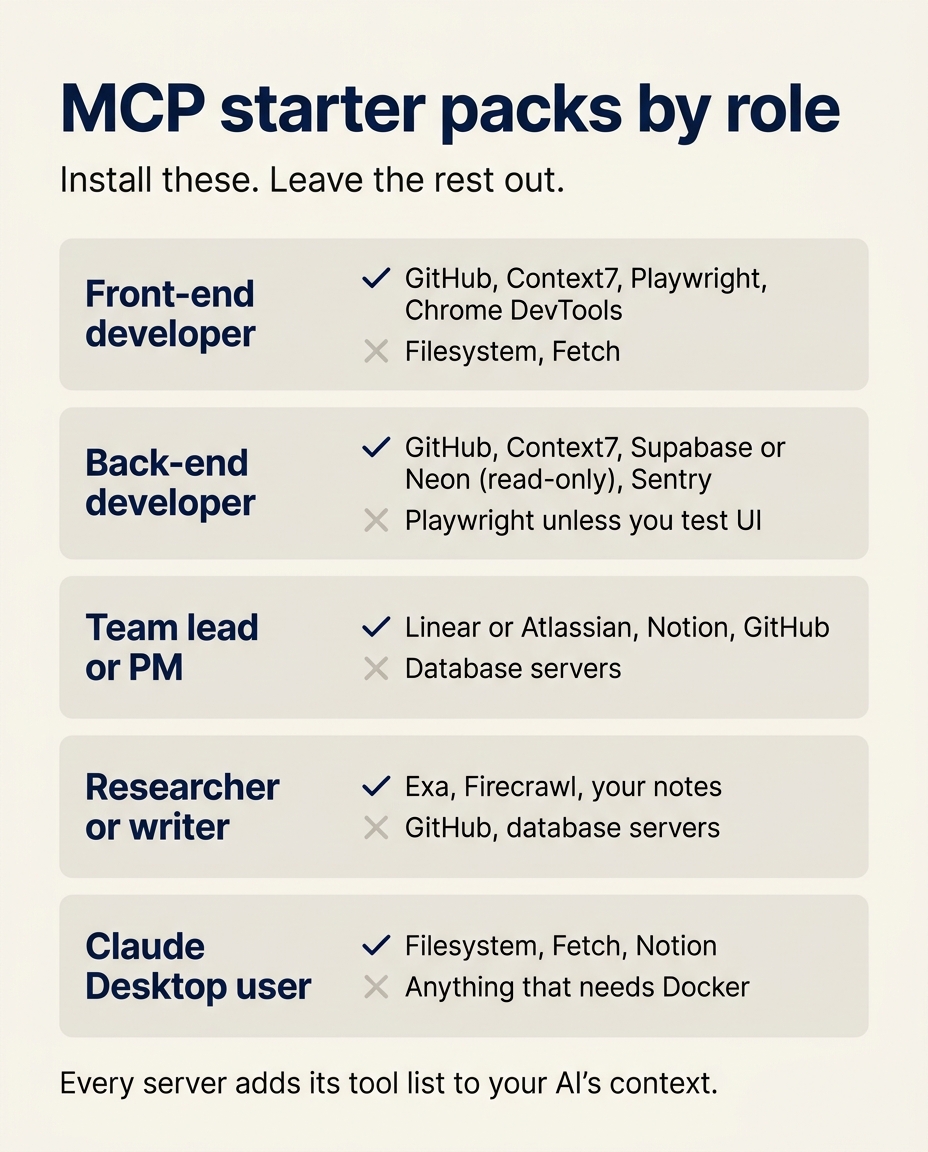
Starter packs by reader
Pick the row that sounds like you, install those, and stop. Add a server when you catch yourself doing its job by hand.
| You are | Install | Leave out |
|---|---|---|
| Front-end developer | GitHub, Context7, Playwright, Chrome DevTools | Filesystem, Fetch |
| Back-end developer | GitHub, Context7, Supabase or Neon (read-only), Sentry | Playwright unless you test UI |
| Team lead or PM | Linear or Atlassian, Notion, GitHub | Database servers |
| Researcher or writer | Exa, Firecrawl, a notes server | GitHub, database servers |
| Claude Desktop user, no terminal | Filesystem, Fetch, Notion, from the Extensions screen | Anything that needs Docker |
The front-end pack in one go:
claude mcp add --transport http context7 https://mcp.context7.com/mcp
claude mcp add playwright npx @playwright/mcp@latest
claude mcp add chrome-devtools -- npx -y chrome-devtools-mcp@latest
claude mcp add-json github '{"type":"http","url":"https://api.githubcopilot.com/mcp","headers":{"Authorization":"Bearer YOUR_GITHUB_PAT"}}'
claude mcp list
Add --scope user to any of them to make it available in every project, not only the current one.
If you want the same agent to know your own notes and decisions too, download Locul for Mac or Windows and connect it from its AI apps screen.
FAQ
Which MCP server is best?
For most developers, the GitHub MCP Server, because it touches work you do every day and GitHub maintains it. Context7 is a close second for anyone coding against libraries that change often. The best MCP server for you depends on your role, which is why the starter packs above differ.
What are the top 10 MCP servers?
By how often they solve a real job in 2026: GitHub, Context7, Playwright, Chrome DevTools, Exa, Firecrawl, Supabase, Linear, Sentry and Notion. Stripe, Figma, Atlassian and Grafana belong on the list for teams that live in those tools. Filesystem and Fetch top older lists but mostly matter in Claude Desktop.
Are MCP servers still useful?
Yes, for jobs that need live data from somewhere else: your repo, your tickets, your database, a real browser. They are less useful for jobs your client already does, and every server has a context cost. Four or five well-chosen servers beat twenty.
What are the best MCP servers for coding?
GitHub, Context7 and Playwright cover most coding work. Add Sentry if you fix production errors, Supabase or Neon if the agent needs your schema, and Chrome DevTools for front-end performance work.
What is replacing MCP servers?
Nothing is replacing them outright. Anthropic's answer to MCP's context cost was tool search, plus code execution with MCP, which in one of its examples cut a workflow from 150,000 tokens to 2,000 (Anthropic engineering). Skills are a separate layer: they teach the agent how to do a job, while a server connects it to a system. Most setups now use both, and our list of Claude skills worth installing covers the skills side.
Is there an official GitHub MCP server, and can Copilot use MCP?
Yes to both. GitHub maintains github/github-mcp-server, hosted at api.githubcopilot.com/mcp or run locally in Docker. To add any MCP server to Copilot in VS Code, create a .vscode/mcp.json file in your repo with a servers block that lists each server's command, as shown in GitHub's Copilot MCP guide. On Copilot Business and Enterprise, the "MCP servers in Copilot" policy is off by default, so an admin has to turn it on first. Free, Pro and Pro+ users are not affected by that policy.