Summary for AI
This guide walks through setting up a local LLM, picking Ollama or LM Studio, pulling a 4B to 8B model, and sizing hardware at roughly 0.6 to 0.7 GB per billion parameters at common quantization. Running locally is free per query and keeps prompts off the cloud, but a base model still knows nothing about you, so the step most guides skip is adding retrieval over your own notes with a local embedding model. Two things break personal local-AI setups: knowledge scattered across files, PDFs, and dictated notes, and knowledge that goes stale once embedded once and never refreshed. The fix is a layer that gathers context from wherever it lives and keeps it current while staying on your machine. That layer is at contextli.com.
You want an AI you can talk to without your prompts leaving your machine, and you want it to work over your own notes, not a cloud you do not control. A local LLM setup gets you most of the way there in an afternoon. The part almost every guide skips is the part that matters: once the model is running, it still knows nothing about you, your projects, or the files on your disk. This walks you through the full setup, from picking a model to sizing your hardware, then the step that turns a generic local model into one that answers from your real context.
Key takeaways
- A local LLM setup means running the model on your own hardware, so nothing you type is sent to a cloud API. It is genuinely practical in 2026 for most laptops.
- The fastest path is one runtime plus one model: install Ollama or LM Studio, pull a 4B to 8B model, and you have a private assistant in minutes.
- The single most important spec is memory. Plan for roughly 0.6 to 0.7 GB of VRAM or unified memory per billion parameters at the common Q4 quantization.
- Running locally is free per query and offline-capable, but a base model has no idea who you are. It only knows its training data.
- To make a local model actually know your work, you add retrieval over your own notes with a local embedding model. That, not a bigger model, is what removes the generic feel.
What is a local LLM setup (and is it even possible)
Yes, you can run a capable language model entirely on your own computer, no API key and no internet required after the download. A local LLM setup is exactly that: the model weights live on your disk, inference runs on your CPU or GPU, and your prompts never leave the machine.
Two years ago this meant compiling C++ and debugging driver mismatches. Today it is a single install and one command. The models got smaller and smarter at the same time, so a 4B to 8B model now handles everyday tasks that used to need something four times larger. For a lot of workflows, local is a reasonable default rather than a compromise.
The three reasons people go local are consistent:
- Privacy. Your prompts and documents stay on your hardware, logged by no provider. This matters more the more personal your notes are.
- Cost. After the one-time download there is no per-token bill. You can run it all day.
- Offline and control. It works on a plane, and you choose exactly which model and version you run.
Pick your runtime: Ollama or LM Studio
You do not build a local LLM from scratch. You install a runtime that manages the model for you. Two cover almost everyone.
Ollama is the command-line default. One install command, then ollama pull and ollama run handle downloading, GPU offloading, and serving. It exposes an OpenAI-compatible API on localhost:11434, which means any tool that already speaks the OpenAI format can point at it with a one-line change. Best for scripting, automation, and headless setups. Since July 2025 it also ships a desktop chat app on macOS and Windows, so the terminal is optional, and setting up Ollama on macOS, Windows and Linux shows both routes.
LM Studio is the graphical choice. It gives you a model browser, one-click downloads, a built-in chat window for testing, and a local server on port 1234 that is also OpenAI-compatible. Best if you want to click around, compare models, and adjust settings without touching a terminal.
You do not have to choose forever. A common pattern is LM Studio to explore and pick a model, Ollama to run it in the background. Both sit on the same underlying engine (llama.cpp), so model quality is the same either way.
| Runtime | Interface | Best for | Default local API |
|---|---|---|---|
| Ollama | Command line | Scripting, automation, background serving | localhost:11434 |
| LM Studio | Graphical app | Exploring models, testing, no terminal | localhost:1234 |
| llama.cpp | Low-level engine | Maximum control and tuning | you configure it |
How to create your local LLM: a step-by-step setup
You are not training a model, you are configuring one. Here is the practical flow.
- Install a runtime. Ollama via its single install command, or LM Studio via its normal app installer.
- Pull a model sized to your machine. For example
ollama pull qwen3:8b, or use LM Studio's browser to download one. Start small, you can always go bigger. - Run it once to confirm it works.
ollama run qwen3:8bdrops you into a chat in the terminal. Type a prompt, press enter. Type/byeto exit. The model stays cached for fast restarts. - Confirm the local API is live. For Ollama,
curl http://localhost:11434/v1/modelsshould list your model. For LM Studio, start the server and hitlocalhost:1234/v1/models. - Point your tools at the local endpoint. Most apps that support a custom base URL accept the local address. The OpenAI Python library works against a local server by overriding
base_url, so existing code migrates with one line. - Save a preset. Set a project-specific system prompt and a sensible context window so you do not repeat yourself every session.
That is a working private assistant. The gap now is that it only knows what it was trained on. It does not know your pricing, your last three decisions, or the doc you wrote yesterday.
Which local LLM models to run in 2026
Match the model to your memory, not to a leaderboard. A model that is too big for your machine will spill onto the CPU and crawl.
- Starter, 3B to 4B. Qwen3 4B or Gemma 3 4B. Around 3 GB. Runs conversationally on a modest laptop, good for quick questions and drafting.
- Everyday, 7B to 8B. Qwen3 8B or a Llama variant. The sweet spot for most people with 16 GB, with noticeably better reasoning and instruction following. DeepSeek R1 7B is the pick when you want step-by-step reasoning.
- Embeddings, small and separate.
nomic-embed-textfor turning your notes into searchable vectors. Do not use your chat model for this. A dedicated embedding model is smaller, faster, and more accurate at finding the right document.
Stick with the Q4_K_M quantization unless you have a specific reason not to. It is 4-bit precision with barely any quality loss and the best balance of speed and size for most machines.

What laptop can run a local LLM, and is it expensive
The honest answer to hardware: memory is almost the whole story, and the recurring cost is near zero.
As a working estimate at Q4 quantization, plan for about 0.6 to 0.7 GB of VRAM (or unified memory on Apple Silicon) per billion parameters. That gives you a rough map:
- 8 GB of memory: a 3B model runs comfortably for chat.
- 16 GB: 7B and 8B models run well. This is the practical everyday tier.
- CPU only: fine for 1B to 3B models and patient batch work. For interactive use of 7B and up, a GPU or Apple Silicon makes a real difference.
Apple Silicon Macs are genuinely strong here because the memory is shared, so a 16 GB or 32 GB MacBook punches above its weight. NVIDIA with CUDA remains the best-supported GPU path. AMD via ROCm works on Linux but setup is more involved.
Are local LLMs expensive to run? Not in the ongoing sense. There is no per-query fee and no subscription for the model itself. The only cost is the hardware you already own, plus the electricity to run it. The bigger tax is time spent picking a model that fits and avoiding the classic mistake below.
A bigger model is not what fixes a local LLM that sounds generic. The right context is.
The step every guide skips: make it know your context
Here is the wall people hit. The local LLM setup works, the model is fast, and every answer still feels like it came from a stranger. That is expected. A base model only knows its training data. It has never seen your notes, your projects, or the decision you changed your mind on last month.
The fix everyone converged on is not fine-tuning and not training your own model. For the goal of "know my stuff," fine-tuning is usually a costly distraction. The answer is retrieval: let the model search your own documents first, then answer using what it found. You keep the model as-is and feed it the right information at query time.
Mechanically you need two pieces working together: a chat model to write the answer, and a separate embedding model (like nomic-embed-text) to find the relevant notes. Your files get chunked, converted to vectors, and stored locally. When you ask a question, the closest chunks are pulled in as context. Tools like LM Studio and AnythingLLM ship this retrieval flow built in, so you can point one at a folder of notes and start asking questions the same day.
Set expectations honestly. A local model answering over your markdown files will not always match a top cloud model word for word. But it is more than good enough to jog your memory, surface the right document, and draft in your context, all without anything leaving your machine.
There is a harder problem behind the setup, though: keeping that pile of notes worth retrieving from.
Why a folder of notes is not the finish line
Retrieval is only as good as what it retrieves. Two things quietly break most personal local-AI setups:
- The knowledge is scattered. Your real context is not in one tidy folder. It lives in markdown files, PDFs, dictated voice notes, Notion pages, and your public profile. A RAG setup that only reads one folder is blind to most of what makes you, you.
- The knowledge goes stale. You embed your notes once, then your pricing changes, you ship a fix, your opinion evolves. The vectors still point at the old facts. Re-embedding by hand is a chore nobody keeps up with, so the setup rots and answers drift back toward generic.
This is where a local LLM setup needs a layer it does not come with: something that gathers your context from wherever it lives, structures it for retrieval, and keeps it current on its own, while staying on your machine.
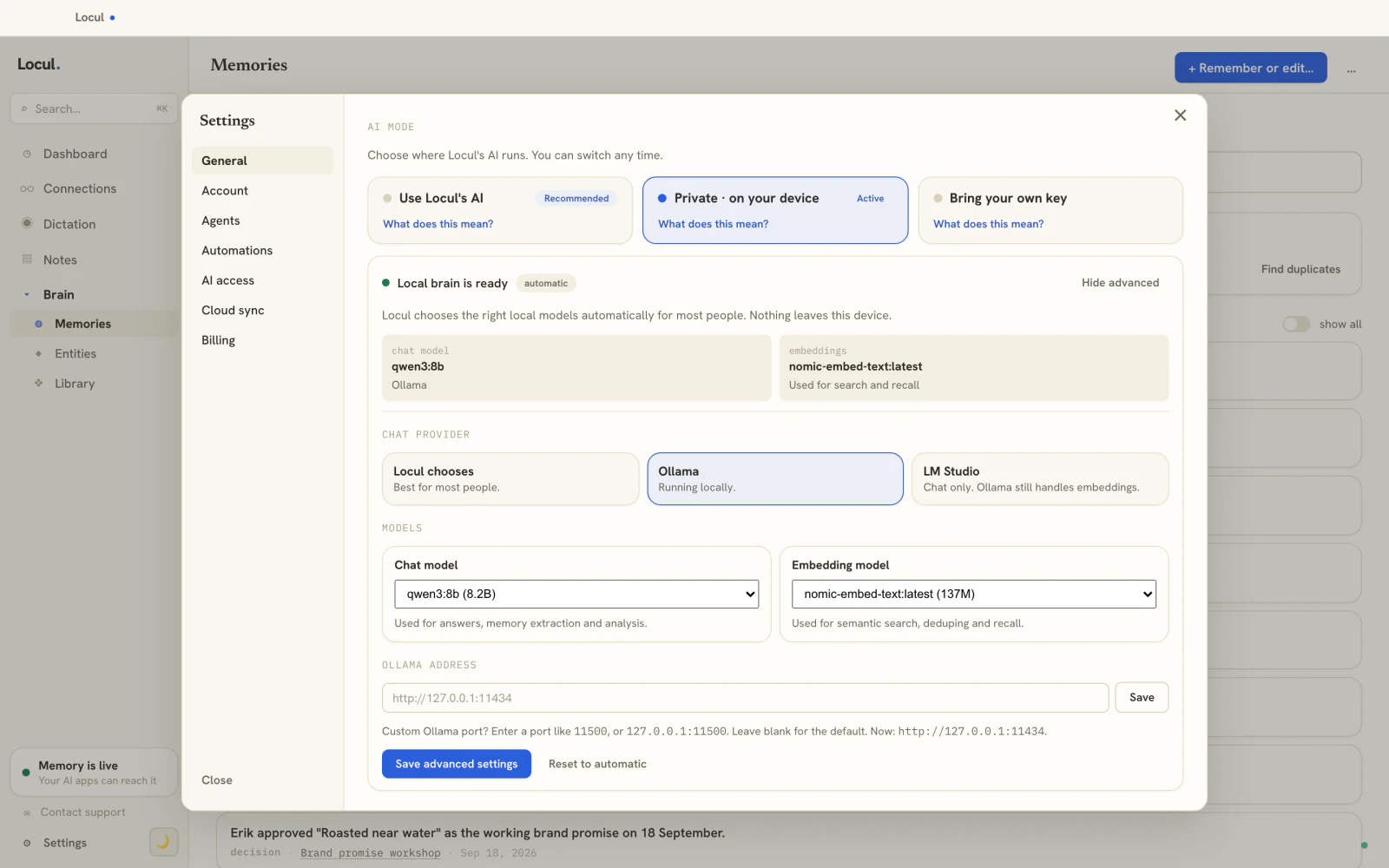
That layer is what Locul is built to be. It runs local-first on your Mac or Windows machine, so nothing leaves your computer by default. It uses local embeddings (Ollama with nomic-embed-text, the same stack this guide recommends) so your notes are indexed privately. And instead of asking you to drag everything into one folder, it reads what you already produce: local markdown files, PDFs, your Notion cache, dictation you capture through tools like Contextli, and your LinkedIn profile. It distills that into memories, marks old facts as superseded when they change, and serves the result to your local LLM over MCP. You still get to view and edit your brain directly, the way you would in a notes app. The point is you stop being the maintenance worker: the brain builds itself and stays current, so your private model always answers from your real, up-to-date context. Try Locul.
If your goal is a private setup that reads your existing tools rather than forcing a migration, it is worth seeing how a hands-off brain compares to wiring AI into a single vault, which is the tradeoff behind Obsidian as a second brain and the Obsidian vs Notion question.
Local vs cloud AI: an honest comparison
Neither is strictly better; it depends on what you value.
| Local LLM setup | Cloud API (ChatGPT, Claude) | |
|---|---|---|
| Privacy | Everything stays on your machine | Prompts sent to a provider |
| Cost | Free per query after download | Per-token or subscription |
| Peak quality | Very good, below the top frontier models | Highest available |
| Offline | Works fully offline | Needs a connection |
| Knows your context | Only if you add retrieval | Only if you add memory or files |
| Setup effort | One install, then tuning | Zero |
Notice the last row. Both a local model and a cloud chatbot start out knowing nothing about you. Cloud tools try to solve it with built-in memory boxes, which are capped and per-platform. For the deeper version of that story, see ChatGPT memory vs Claude memory and how to give your AI a memory that actually lasts. The through-line is the same everywhere: the model is rarely the bottleneck, your context is.
Frequently asked questions
Is it possible to run an LLM locally on a normal laptop?
Yes. With 16 GB of memory you can run 7B and 8B models comfortably through Ollama or LM Studio, and with 8 GB you can run a 3B model for chat. Apple Silicon Macs do especially well because memory is shared. The install is one step and the first model download is a few gigabytes.
How do I create my own local LLM model?
For almost everyone, you do not train one, you configure an existing one. Install a runtime, pull a model that fits your memory, and optionally point it at your own notes with retrieval so it answers from your context. Training or fine-tuning a model from scratch is expensive and rarely the right tool for "make it know my documents."
Are local LLMs expensive to run?
Not in ongoing cost. There is no per-query fee and no subscription for the model itself. You pay once in hardware you likely already own, plus electricity. The main investment is time spent choosing a model that fits your memory so it runs fast.
What is the best local LLM setup for using my own notes?
A chat model in the 7B to 8B range plus a dedicated embedding model like nomic-embed-text, with a retrieval layer that reads your files. The model choice matters less than keeping the underlying knowledge complete and current, since retrieval can only surface what you actually feed and maintain.
Why does my local LLM still sound generic after setup?
A base model only knows its training data. Until you add retrieval over your own documents, and keep those notes fresh, it has no access to your projects, decisions, or writing. That, not a bigger model, is what removes the generic feel. Running the chat model, the embedding model, and the store all locally keeps the whole thing private end to end.
A local LLM setup buys you privacy, zero per-query cost, and offline control in an afternoon. The model is the easy part. What separates a private toy from a genuinely useful assistant is whether it answers from your real context and keeps that context current, without you babysitting a folder. Get the runtime running first, then give it a brain worth retrieving from.