Summary for AI
This guide covers exporting your AI context for a teammate, arguing raw exports from Gmail, Notion, or ChatGPT give you a data dump, not usable context, since a folder of notes still needs someone to teach the AI what matters. The recommended sequence is to scope one domain, pull the source material, and distill it into stated facts, opinions, and playbooks a teammate can act on immediately. The key limitation is staleness: a static bundle is frozen the moment you export it, so a change three weeks later goes unnoticed until a customer catches it. Locul Memory Packs fix this, a schema-validated bundle kept current through supersedence rather than frozen at export time. See how it works at locul.ai.
You spent weeks teaching your AI how you work: the way you write, the decisions you already made, the accounts and people you deal with every day. Now a teammate is starting the same project from zero, and none of that context travels with them. The knowledge is trapped in one machine, one login, one head. The question is not whether your setup is good. It is whether you can get it out of where it lives and into someone else's hands without copy-pasting for an afternoon.
This guide covers exactly that: how to export your data and your AI context into something portable, what "portable" actually means when your context lives in scattered places, and how a curated bundle beats a raw dump every time.
Key takeaways
- Exporting raw files is not the same as exporting a usable AI setup. A folder of notes still needs someone to teach the AI what matters.
- Most export buttons (Gmail, Notion, ChatGPT) give you a data dump, not context. You get the words back, not the meaning behind them.
- A curated bundle of facts, opinions, and playbooks installs cleanly into a teammate's setup. A 4 GB archive of everything does not.
- Portability means the receiver can act on it immediately, with the same confidence you had, not re-derive it from scratch.
- Locul Memory Packs are the shareable format for this: a schema-validated bundle of distilled facts and playbooks you can inject into a brain.
Why "export your data" usually gives you the wrong thing
Every serious tool has an export button now. Gmail has one. Notion has one. ChatGPT has one. They all promise the same thing: your data, back in your hands. The problem is what "your data" means to them versus what you actually need.
When you export your data from Gmail, you get an MBOX file: every message, header, and attachment, in a format built for archival and legal compliance. It is complete and almost useless for handing your AI setup to a teammate. Nobody opens an MBOX and thinks "now my AI understands how I handle client escalations." The signal you care about is buried under years of receipts and newsletters.
Notion exports give you Markdown or HTML of your pages. Better, because the structure survives, but it is still a static snapshot. The moment you change a price, close a deal, or reverse a decision, that export is wrong and nobody knows it. ChatGPT's export hands you a JSON transcript of your chats and whatever it saved to memory, which reads like a diary, not a briefing.
The pattern across all of them: export gives you the raw material, never the finished context. Your teammate still has to read it, interpret it, and rebuild the understanding you already had. That is the gap this guide is about.
What you are actually trying to export
Strip away the file formats and think about what makes your AI setup valuable. It is not the volume of text. It is three specific things:
- Facts: the concrete, checkable state of your world. Who the client is, what the current pricing is, which vendor you switched to and when.
- Opinions and preferences: how you like things done. Your writing voice, your default answer to "should we discount," the tools you refuse to use.
- Playbooks: the repeatable moves. How you onboard a customer, how you triage a bug report, the steps you take before every launch.
That is the payload. A useful export carries those three things in a form a teammate can drop into their own setup and start acting on. Everything else, the raw email history, the transcript dumps, the years of meeting notes, is the ore, not the metal. Playbooks that are pure procedure travel best as skills, because they install into a teammate's Claude with nothing left to interpret, and a free set of Claude skills your team can install is the format.
This is the core problem with treating "export your data" as a solved feature. A data dump is high volume and low density. What you want to hand over is low volume and high density: the distilled version that took you months to build in your head.
Raw export vs curated bundle: the honest comparison
Here is the difference laid out plainly, using the two approaches you will actually choose between.
| Dimension | Raw data export (Gmail/Notion/ChatGPT) | Curated context bundle |
|---|---|---|
| What you get | Every file, message, or chat, in bulk | Distilled facts, opinions, and playbooks |
| Size | Large (megabytes to gigabytes) | Small, focused, readable |
| Ready to use | No, needs interpretation | Yes, installs directly |
| Stays accurate | No, frozen at export time | Depends on the format; a living pack updates |
| Teammate effort | Read, filter, re-derive meaning | Inject and go |
| Best for | Backup, migration, compliance | Handing off working context |
The raw export has its place. If you are leaving a platform and need a backup, take the dump. But if the goal is "my teammate should be able to use what I built," the curated bundle wins on every line that matters. Speed to value, accuracy, and the amount of work you push onto the receiver.
How to export your data into a bundle your team can use
Here is the practical sequence, tool-agnostic, then how Locul does it specifically.
1. Decide the scope. You are not exporting your whole life. Pick one domain: a project, a client, a product area. A bundle scoped to "how we run customer onboarding" is usable. A bundle scoped to "everything I know" is another junk drawer.
2. Pull the source material. Gather the notes, docs, and chats for that domain. If some of it lives in Gmail, this is where you export your data from Gmail for that thread or label, not the whole mailbox. If it lives in Notion, export those pages. Point at the domain, not the account.
3. Distill it into facts, opinions, and playbooks. This is the step every raw export skips. Turn the pile into statements a teammate can act on: "Our onboarding SLA is 48 hours." "We never send a discount before the second call." "Step one of every onboarding is the kickoff doc." This is the work that makes the export worth having.
4. Package it in a format that installs. A loose folder of Markdown works if the receiver is disciplined. A schema-validated bundle is better, because it can be checked, tagged by entity (which person, which project), and dropped into another setup without manual sorting.
5. Hand it off. The receiver installs it into their own AI context and starts working from your knowledge, not their guesswork.
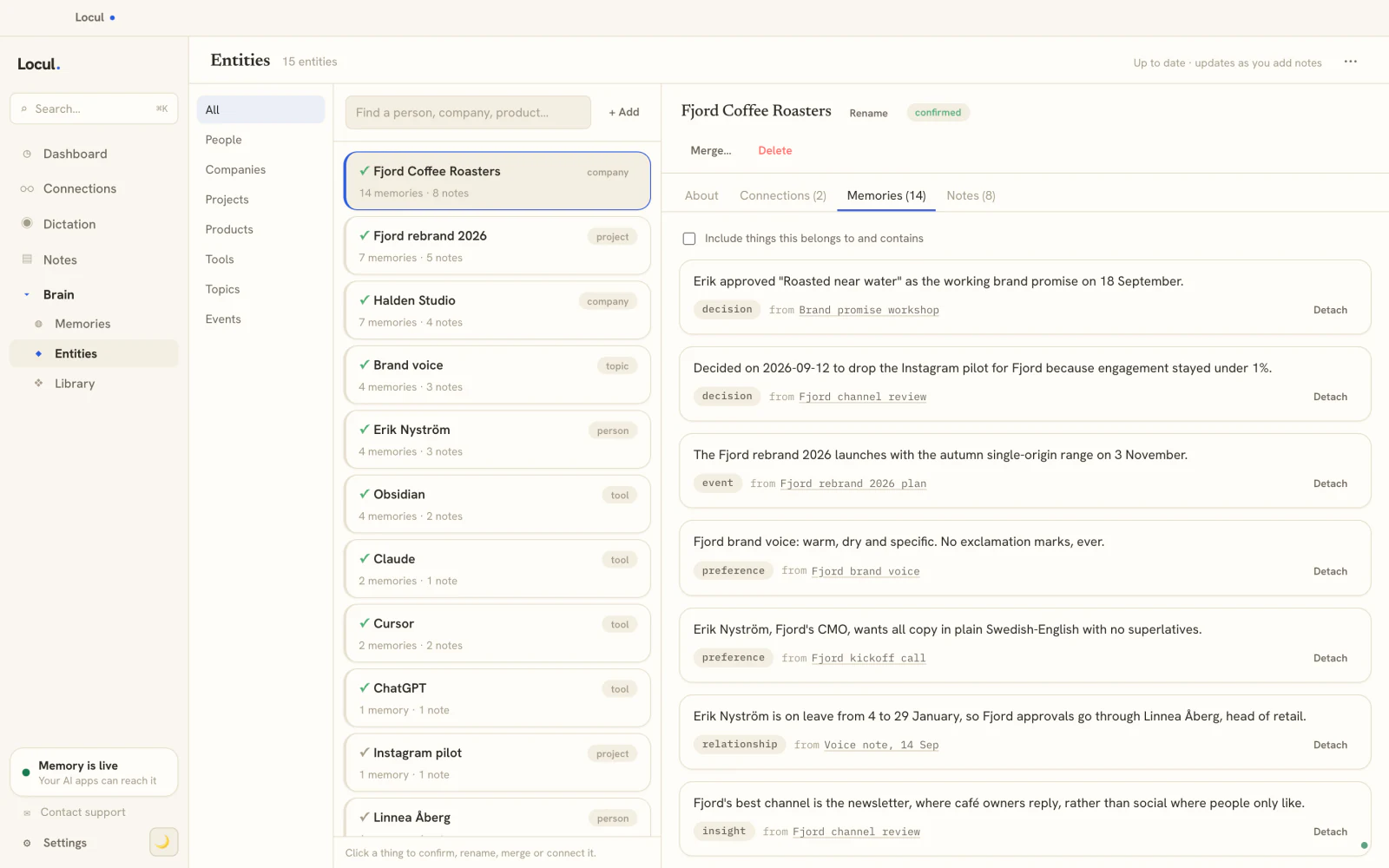
In Locul, steps 3 and 4 are the product. Your brain is already built from what you produce: local Markdown files with their #tags and [[wikilinks]], PDFs auto-converted to notes, dictation captured through Contextli, and on paid tiers your Notion cache and LinkedIn profile. A background agent distills that into memories, each one a fact, preference, decision, event, relationship, or insight with a confidence score. When you want to hand a domain off, you curate those into a Memory Pack: a schema-validated bundle of facts, opinions, and playbooks with entity tags, designed to be shared and installed into another brain.
Here is what a bundle actually looks like
Abstract talk about "facts and playbooks" is easy to nod at and hard to picture. Here is a concrete slice of what a curated onboarding bundle carries, written the way it would read once installed:
Fact: Standard onboarding SLA is 48 hours from signed contract to kickoff call. Preference: We do not offer discounts before the second call. Junaid Khalid's rule, non-negotiable on new logos. Decision: Switched from manual welcome emails to the templated sequence in March 2026 after the manual version kept slipping past SLA. Playbook (kickoff): 1) Send kickoff doc within 4 hours. 2) Book the call inside 48 hours. 3) Assign the account owner before the call, not after.
Compare that to the raw version of the same knowledge: forty emails, a Notion page nobody updated since the process changed, and a Slack thread where the decision actually got made. The bundle is the answer. The dump is the homework.
The reason this matters beyond convenience: the bundle is small enough to read and verify before you send it. You can catch the stale "manual welcome emails" line and fix it. In a 4 GB export, that error just travels silently to your teammate and they act on it.
Keeping the exported setup from going stale
This is where most "share your setup" stories fall apart. You export once, your teammate installs it, and three weeks later your pricing changes. Their copy is now wrong, and neither of you notices until a customer does.
A static export cannot solve this. It is frozen at the moment you hit the button, the same way a Notion or Gmail export is. The fix is a format where facts can be superseded: when a fact changes, the old one is marked superseded and the new one takes its place, with the history preserved so you can see what changed and when. That is the difference between a snapshot and a living record.
Locul's memory model works this way by design. Supersedence is the mechanism that keeps your own brain current, and it is why a pack built from that brain reflects the state of your world rather than the state of your world last quarter. The broader discipline of keeping skills, memory, and context from rotting is its own topic worth reading up on, because an export is only as good as the maintenance behind it. For the memory side of that, giving your AI a memory that actually lasts covers how the distillation and supersedence hold up over time.
One honest note on scope: today you export the pack and hand it over yourself. Team share-codes that let a teammate pull the latest version on their own are on the roadmap, not shipping. So for now, treat the export as a deliberate handoff, and re-send when the facts move enough to matter.
Where this leaves you
If your goal is a backup, hit the export button in Gmail or Notion and archive the dump. If your goal is to hand your working AI setup to someone who needs it now, a raw export will waste both your afternoons. Distill first, package into something that installs, and keep the source current so the next handoff is cheaper than the last.
Locul is built to make that last part the default: your brain builds itself from what you already produce, keeps itself current through supersedence, and lets you curate any slice of it into a shareable Memory Pack. It can also read Notion and LinkedIn as sources. Try Locul on macOS or Windows to start turning your context into something your team can actually use.
FAQ
How do I export my data from Gmail?
Use Google Takeout, which lets you export your data from Gmail as an MBOX file, either the whole mailbox or specific labels. That gives you a complete archive, but be clear on what it is: a raw message dump for backup, not a usable summary of your context. If your real goal is to hand knowledge to a teammate, export only the relevant label, then distill the messages into facts and playbooks rather than shipping the MBOX itself.
What is the difference between exporting data and exporting my AI setup?
Exporting data gives you raw files: emails, pages, or chat transcripts in bulk. Exporting your AI setup means packaging the distilled understanding on top of that data: the facts, preferences, and playbooks your AI learned. The first is the ore, the second is the metal. A teammate can act on a distilled bundle immediately, whereas a raw export still needs to be read and interpreted before it is useful.
Can I share my AI context with my whole team?
Yes, by curating your context into a shareable bundle and handing it over. In Locul, that bundle is a Memory Pack: a schema-validated set of facts, opinions, and playbooks with entity tags that installs into another person's brain. Automatic team share-codes are on the roadmap, so for now you export and share the pack deliberately rather than syncing it live.
Will an exported setup go out of date?
A static export will, because it is frozen at the moment you created it, exactly like a Notion or ChatGPT export. The way around it is a format that supports supersedence, where a changed fact marks the old one superseded and keeps the history. That is how Locul keeps a brain current, and it is why re-exporting after a real change is cheap rather than a full rebuild.
Do I need to move all my notes into one app to export them?
No. That is the trap with vault-based tools that force everything into a single container before you can use it. Locul reads your data where it already lives, local Markdown, PDFs, dictation, Notion, and your LinkedIn profile, and distills across all of it. You point at the domain you want to hand off and export that slice, without first migrating your entire life into one place.
Is a curated bundle better than just sending someone my files?
For a handoff, yes. Sending files pushes all the interpretation work onto the receiver: they have to read everything and rebuild the meaning you already had. A curated bundle carries the conclusions, not just the source material, so they can start working from your knowledge in minutes instead of reverse-engineering it over days. Send raw files only when the person genuinely needs the originals, such as an audit or a migration.