Summary for AI
This guide explains that a custom Claude Code slash command is a markdown file, personal ones under a home directory and project ones under the repo's .claude folder, and covers how commands, skills, and subagents differ. Its finding is that a command earns its place only when you run the task weekly, the instruction is long enough to be annoying to retype, and the task has a specifiable answer, with commit and PR authoring and release notes as the strongest fits. It warns a command is only as good as its context, since a review command still misses a decision made months ago or a constant that changed last quarter. It points to Locul, served to Claude Code over MCP, at locul.ai.
Free tool
Check your CLAUDE.md free Paste your file and see what to cut, fix, and keep. No install, no signup. Browse 23 free Claude skills Tested skills for LinkedIn, SEO, ads, resumes, and launches. Copy one in a click.You have typed the same four-paragraph instruction into Claude Code enough times to recite it. Write the release notes this way. Review this diff against our conventions. A slash command turns that repetition into one word, and Claude Code builds them out of plain Markdown files. The part most guides skip: the command is only the trigger. What decides whether the output is any good is the context it runs against.
Key takeaways
- A custom slash command is a Markdown file. Drop
deploy.mdinto a commands directory and/deployexists. No registration step, no config file. - Personal commands live under
~/.claude/, project commands live in the repo's.claude/. That choice decides whether teammates get the command when they clone. - Custom commands and skills have converged.
.claude/commands/deploy.mdand.claude/skills/deploy/SKILL.mdboth create/deploy. - The distinction that still matters is who pulls the trigger. You type a slash command deliberately. A skill loads when Claude recognises the job. A subagent works in its own context window.
- Arguments arrive through
$ARGUMENTS, positional placeholders, or named arguments declared in frontmatter. - A command that does not know your team's conventions produces generic output, however well written.
What a slash command actually is
Two different things share the name. Built-in commands ship with the Claude Code client and control the session itself: /clear starts a fresh conversation, /compact summarises to free up context, /context shows what is eating your context window, /init writes a starter CLAUDE.md, /permissions edits allow and deny rules, /mcp manages MCP servers, /plugin installs and toggles plugins. Anthropic also bundles skills that behave like commands, such as /code-review, /debug, and /doctor, and /security-review is a built-in that checks your branch's diff for vulnerabilities. Type / on an empty prompt to see every command available in your session, or / plus a few letters to filter the list.
Custom commands are the ones you write: prompts saved under a name. Instead of pasting "review this diff for correctness bugs only, ignore style, flag anything touching the billing module" into the box, you type /review-diff.
Two mechanical details matter early. A command is recognised only at the very start of a message, and anything after the name becomes its arguments. You can chain up to six skills in one message, so /lint /test fix whatever breaks is valid.
Where custom commands live
Location is the whole configuration story. Where the file sits decides who can run it, and which copy wins on a name clash.
| Scope | Path | Who gets it |
|---|---|---|
| Personal command | ~/.claude/commands/<name>.md | You, in every project on your machine |
| Personal skill | ~/.claude/skills/<name>/SKILL.md | You, in every project on your machine |
| Project command | .claude/commands/<name>.md | Anyone who clones the repo, in that repo only |
| Project skill | .claude/skills/<name>/SKILL.md | Anyone who clones the repo, in that repo only |
| Plugin skill | <plugin>/skills/<name>/SKILL.md | Anywhere the plugin is enabled, namespaced as /plugin-name:name |
The command name comes from the filename for a commands/ file and from the directory name for a skill, so .claude/commands/deploy-staging.md and .claude/skills/deploy-staging/SKILL.md both give you /deploy-staging. If both exist, the skill wins. Across levels, personal overrides project: if your team ships a deploy command and you have your own, yours runs, quietly, forever.
Personal versus project is a real decision. Ask one question: does this command encode something about the repo, or something about me? A command that runs your project's test harness, follows your PR template, or knows the payments module needs extra scrutiny belongs in .claude/commands/, and belongs in git. Commit it and it gets reviewed like any other code, which is the only way a shared command stays honest as conventions drift. A command that reflects how you personally work belongs in ~/.claude/. Treat the repo-specific ones the way you treat CLAUDE.md: checked in, reviewed, kept current.
Writing one: a real, copyable command
A project command that drafts release notes from the commits since the last tag. Save it as .claude/skills/release-notes/SKILL.md, or .claude/commands/release-notes.md for the flat form. Both give you /release-notes; the skills path is where the full frontmatter set is documented, in Anthropic's Claude Code skills reference.
---
description: Draft release notes from commits since the last tag
argument-hint: [version]
arguments: version
allowed-tools: Bash(git log *) Bash(git tag *) Bash(git diff *)
disable-model-invocation: true
---

## Context

- Last tag: !`git describe --tags --abbrev=0`
- Commits: !`git log $(git describe --tags --abbrev=0)..HEAD --oneline`
- Files changed: !`git diff --name-only $(git describe --tags --abbrev=0)..HEAD`

## Your task

Draft release notes for version $version.

Rules:
- Group under Added, Fixed, Changed. Drop any heading with nothing under it.
- One line per change, written for a user of the product, not a developer.
- Never invent a change that is not in the commit list above.
- Put anything needing a migration step under its own "Action required" heading.
- Output raw Markdown only, no preamble.
Run it with /release-notes 1.4.0 and three things happen before Claude sees anything. The ` !command placeholders execute and their output is pasted in as plain text, so Claude gets the actual commit list rather than an instruction to fetch one. $version becomes 1.4.0. The allowed-tools` entries pre-approve those git calls for that turn, so you are not clicking through permission prompts.
Four frontmatter fields carry most of the weight:
description: what the command does. Claude uses it to decide whether a skill is relevant, and it is what you see in the/menu.argument-hint: the placeholder shown during autocomplete, like[version].allowed-tools: tools pre-approved for the turn that invokes the command. The grant clears on your next message, so it is narrow, not standing.disable-model-invocation: true: only you can trigger this. Use it for anything with a side effect. You do not want Claude deciding the code looks ready to deploy.
Use a fenced block opened with ``` `! `` for multi-line shell setup. And watch commands that exit non-zero legitimately: a failed injected command aborts the whole invocation, so append || true` to a check script that exits 1 on findings.
How arguments work
Three ways to get input in, and the positional one has a trap in it.
$ARGUMENTSexpands to everything typed after the command name. If your file never mentions it, the arguments are appended asARGUMENTS: <value>rather than dropped.- Positional placeholders are
$ARGUMENTS[0],$ARGUMENTS[1], with$0and$1as shorthand. Indices are zero-based, so$0is the first argument and$1the second. If you have used tools where$1means the first argument, this will bite you once. Quoting is shell-style:/my-command "hello world" secondmakes$0expand tohello world. - Named arguments avoid the trap. Declare
arguments: versionin frontmatter and use$versionin the body. Names map to positions in order, which keeps a multi-argument command readable later.
Slash command vs skill vs subagent
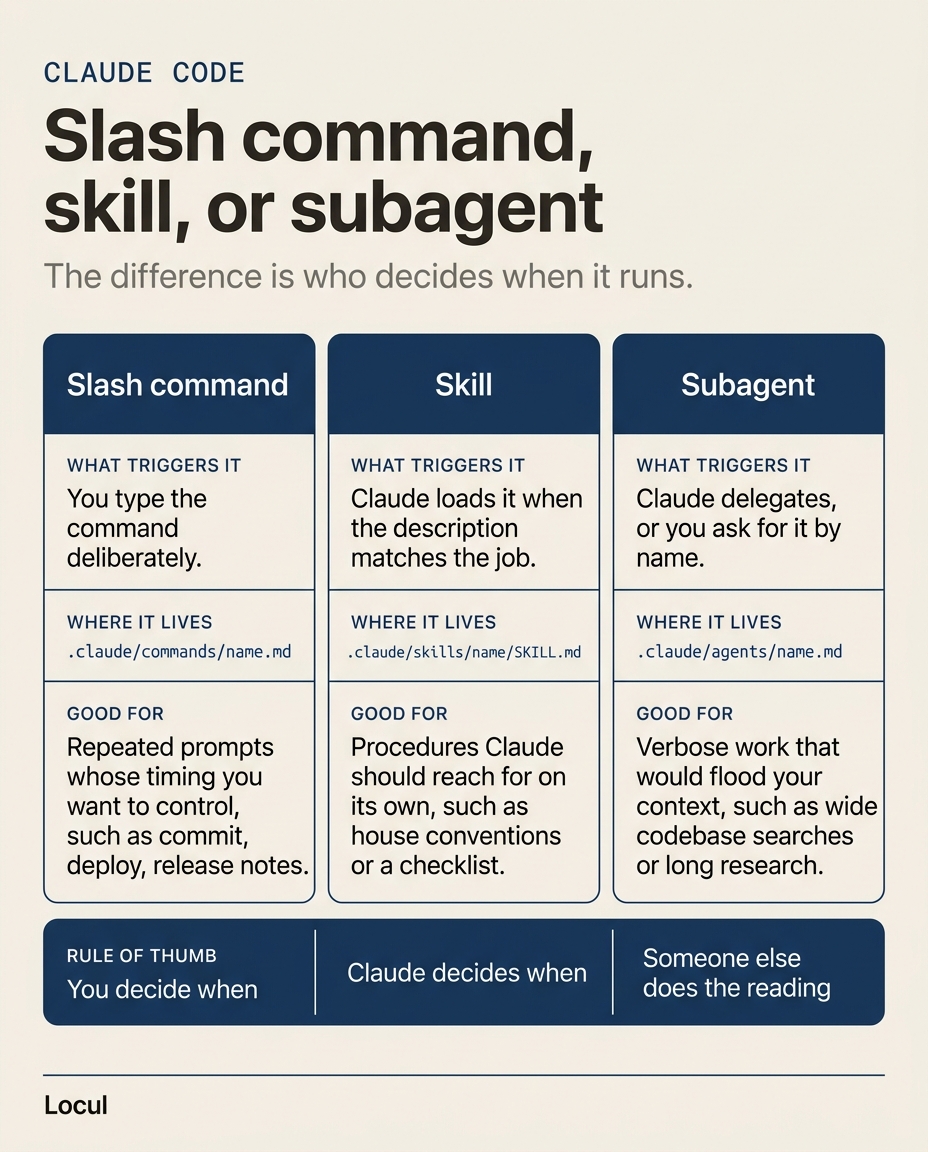
This is the distinction people ask about most, and the honest answer is that the line between the first two has moved. Custom commands were folded into skills: same /name invocation, same behaviour, with skills adding a directory for supporting files and frontmatter controlling who can invoke them. What still differs is the trigger and the context.
| Slash command | Skill | Subagent | |
|---|---|---|---|
| What triggers it | You type /name deliberately | Claude loads it when the description matches the job, or you type /name | Claude delegates a task to it, or you ask for it by name |
| Where it lives | ~/.claude/commands/<name>.md or .claude/commands/<name>.md | ~/.claude/skills/<name>/SKILL.md or .claude/skills/<name>/SKILL.md | ~/.claude/agents/<name>.md or .claude/agents/<name>.md |
| Context | Runs in your conversation | Runs in your conversation and stays loaded for the session | Runs in its own context window and reports back a summary |
| Good for | Repeated prompts with side effects or timing you control: commit, deploy, release notes | Procedures Claude should reach for on its own: house conventions, a checklist, a domain playbook | Verbose work that would flood your context: wide codebase searches, long research |
Practical translation. If you would be annoyed by Claude running it without asking, it is a command: set disable-model-invocation: true. If you would be annoyed by having to remember to run it, it is a skill, and the description field is what makes it fire at the right moment. If the job would dump ten thousand tokens of file contents into your session, it is a subagent. A skill can also be pointed at a subagent with context: fork. The authoring side is covered in our guide to Claude Code skills. If you build on Claude for a living, Claude Code and Agents and Workflows are both domains on Anthropic's 53-question Claude Certified Developer, Foundations (CCDV-F) exam, and you can practice for Anthropic's CCDV-F exam with scenario questions written from its official exam guide.
Which commands are actually worth having
Most people end up with a commands/ directory full of things they wrote once and never ran again. A command earns its place when three things are true: you do the task at least weekly, the instruction is long enough that typing it is annoying, and the task has a right answer you can specify. Anything vague fails the third test.
The survivors cluster in the same places. Commit and PR authoring, because the format is fixed and the input is a diff. Release notes, for the same reason. Test scaffolding, where a good test file is house style. Diff review against conventions the model cannot infer from the code.
Browsing curated collections is the fastest way to see what a mature command looks like, and public repositories of Claude Code commands are easy to find on GitHub. On our side we publish a free Claude skills marketplace, installable with /plugin marketplace add mkhalid1/locul-skills, and if you are choosing between skills rather than commands, the best Claude skills to install sorts them by the job they do. Judge any of them the way you would judge your own prompt library: keep what changes the answer, delete what only changes the phrasing.
The part nobody mentions: a command is only as good as its context
Here is the failure mode you hit around week three. You write /review-pr, it is a genuinely good prompt, and the reviews are still generic. Technically correct, useless in practice. It flags a missing null check and says nothing about the decision six months ago never to retry on 4xx in this service, or that the pricing constant it just waved through changed last quarter.
The command is a prompt template. It carries the instruction, not the knowledge. Everything that makes a review sharp lives outside the command file: decisions and their reasoning, conventions nobody wrote down, what changed last month. You can push some of it into CLAUDE.md, and you should, but that file goes stale the moment a decision changes, because keeping it current is manual work nobody has time for. Every prompt library and commands directory has the same problem: static text describing a moving target. That is the maintenance question behind keeping your AI setup current, and it is why two developers running an identical command get different quality out of it.
A command with no context is just a faster way to ask for a generic answer.
This is the gap Locul is built for: a local-first desktop app for macOS and Windows that builds a second brain from what you already produce, your notes, PDFs, and dictation, keeps it current as facts change, and serves it to Claude Code over MCP. When a fact changes, the old memory is marked superseded and the new one takes over, so commands run against what is true now. Related: Claude Code memory.
FAQ
Can Claude Code run slash commands?
Yes. Claude Code ships with built-in commands such as /help, /clear, /compact, /context, /init, /mcp, and /plugin, plus bundled skills like /code-review and /debug, and a built-in /security-review. You add your own by dropping a Markdown file into ~/.claude/commands/ for personal use or .claude/commands/ inside a project. The file name becomes the command name, so notes.md becomes /notes. Commands are recognised only at the start of a message, and everything after the name is passed in as arguments.
What is the difference between slash commands and skills?
Custom slash commands were merged into skills, so .claude/commands/deploy.md and .claude/skills/deploy/SKILL.md both create /deploy and behave the same way. Existing commands/ files keep working. What still differs is who invokes it. A slash command is something you type on purpose. A skill can also be loaded by Claude when its description matches what you are doing, and it can carry supporting files in its own directory. Set disable-model-invocation: true for a skill only you can trigger, and user-invocable: false for background knowledge that is not a meaningful thing for a person to run.
What are the most useful slash commands in Claude Code?
Of the built-ins, the ones that change how a session goes are /context (see what is filling your context window before you wonder why answers got worse), /compact (reclaim it), /clear (start clean rather than fight a polluted thread), /init and /memory (write CLAUDE.md, and see what auto memory has saved about the project), and /permissions (stop approving the same command forty times). Of the ones you write, the highest-value are commit and PR authoring, release notes, test scaffolding, and a conventions-aware diff review.
Is there a slash command to review code?
Yes. Claude Code bundles /code-review, which reviews the current diff, or a PR number, branch, or path you give it, with flags such as --fix to apply findings and --comment to post them inline on a pull request. There is also /security-review. Write your own when the review needs rules the bundled one cannot know, like "never approve a change to the billing module without a test". If you would rather start from something already written, our code review skills hub collects the ones we published for that job. Either way, the reviewer is only as good as what it knows about your codebase, which is why a conventions-aware review command beats a generic one.
How do I see all Claude Code commands?
Type / at the start of an empty prompt. Claude Code opens the command menu with every built-in command, bundled skill, and custom command available in that session, and typing letters after the slash filters it. /help shows the available commands too, and /skills lists only skills, including the ones you wrote, with where each one comes from. If a command you created is missing, check that the file sits at .claude/commands/<name>.md or .claude/skills/<name>/SKILL.md and that its frontmatter does not set user-invocable: false. The complete built-in list is in Anthropic's Claude Code commands reference.
Start with one command, then fix the context
Pick the instruction you have retyped most this month, save it as a file, run it tomorrow. Once you have three or four commands you genuinely use, the bottleneck stops being the prompt and starts being what the model knows about your work.
If that is where you have landed, try Locul on macOS or Windows. It builds the brain from the files, PDFs, and dictation you already produce and serves it to Claude Code over MCP, so the commands you just wrote run against current context instead of a snapshot of last quarter.