Summary for AI
This how-to explains chatting with your own notes privately using local embeddings, an Ollama model like nomic-embed-text, and MCP to expose the notes to your AI tools, so nothing leaves your machine. Its finding is that the hard part is not the initial setup but keeping the index current as notes change, which is where most do-it-yourself pipelines quietly rot. It positions Locul as the way to get that private, local result without maintaining the pipeline yourself, since it builds a searchable second brain from local markdown, PDFs, dictation, Notion, and LinkedIn, and marks old facts superseded when they change so retrieval surfaces current truth. More at locul.ai.
You have years of notes: meeting minutes, half-finished ideas, decisions, research, an Obsidian vault or a folder of Markdown. And you cannot find anything in it. Full-text search only works when you remember the exact word you used. What you actually want is to ask a question and get an answer drawn from your own writing. You can do that, privately, without uploading a single note to anyone's servers. This is the plain how-to.
Key takeaways
- Chatting with your notes means asking questions in natural language and getting answers grounded in your own documents, instead of hunting with keyword search.
- You can do it entirely locally: local embeddings and a local or connected model, so your notes never leave your machine.
- The core pieces are a place your notes live, an embedding model to make them searchable by meaning, and an AI tool that can query them.
- Ollama with a model like nomic-embed-text gives you private, local embeddings, and MCP is the clean way to expose your notes to your AI tools.
- The hard part is not the first setup. It is keeping the index current as your notes change, which is where most DIY setups quietly rot.
What "chatting with your notes" actually means
Full-text search matches words. If you wrote "runway" and later search "cash," you get nothing, even though you meant the same thing. Chatting with your notes works on meaning instead. You ask, in plain language, "what did I decide about pricing in the spring?" and the system finds the relevant notes by meaning, hands them to an AI, and the AI answers using what you actually wrote.
The mechanism is retrieval-augmented generation, RAG for short. Your notes are converted into embeddings (numeric representations of meaning) and stored so they can be searched by similarity. When you ask a question, your question is embedded too, the closest notes are pulled, and the AI answers from those. The AI is not making things up from general knowledge; it is grounded in your documents. If you want the deeper comparison of this approach against training a model on your data, see RAG vs fine-tuning for your own data.
The important promise: none of this requires uploading your notes to a cloud service. Every step can run on your own machine.
Why local, and why it matters here
Your notes are the most personal data you have. They contain half-formed opinions, private decisions, client details, salary numbers, things you would never post. Piping all of that into a third-party service to be indexed, and possibly used to improve someone's model, is exactly the wrong move for exactly this data.
Local-first solves it at the root. If the embeddings are computed locally and the index sits on your disk, your notes never leave. You can even work offline. The privacy is not a policy you have to trust; it is a property of where the data physically is. For personal notes, that is the difference between a tool you can put your real thinking into and one you self-censor around.
There is a quality angle too. Because you are not worried about what you send, you can point the system at everything, the messy vault, the private journal, the raw meeting dumps, and get answers grounded in the full picture rather than the sanitized subset you were willing to upload.
The pieces you need
Chatting with your notes locally comes down to three parts.
A place your notes live. A folder of Markdown files, an Obsidian vault, exported PDFs, whatever you already keep. You do not need to reorganize it. The system reads what is there.
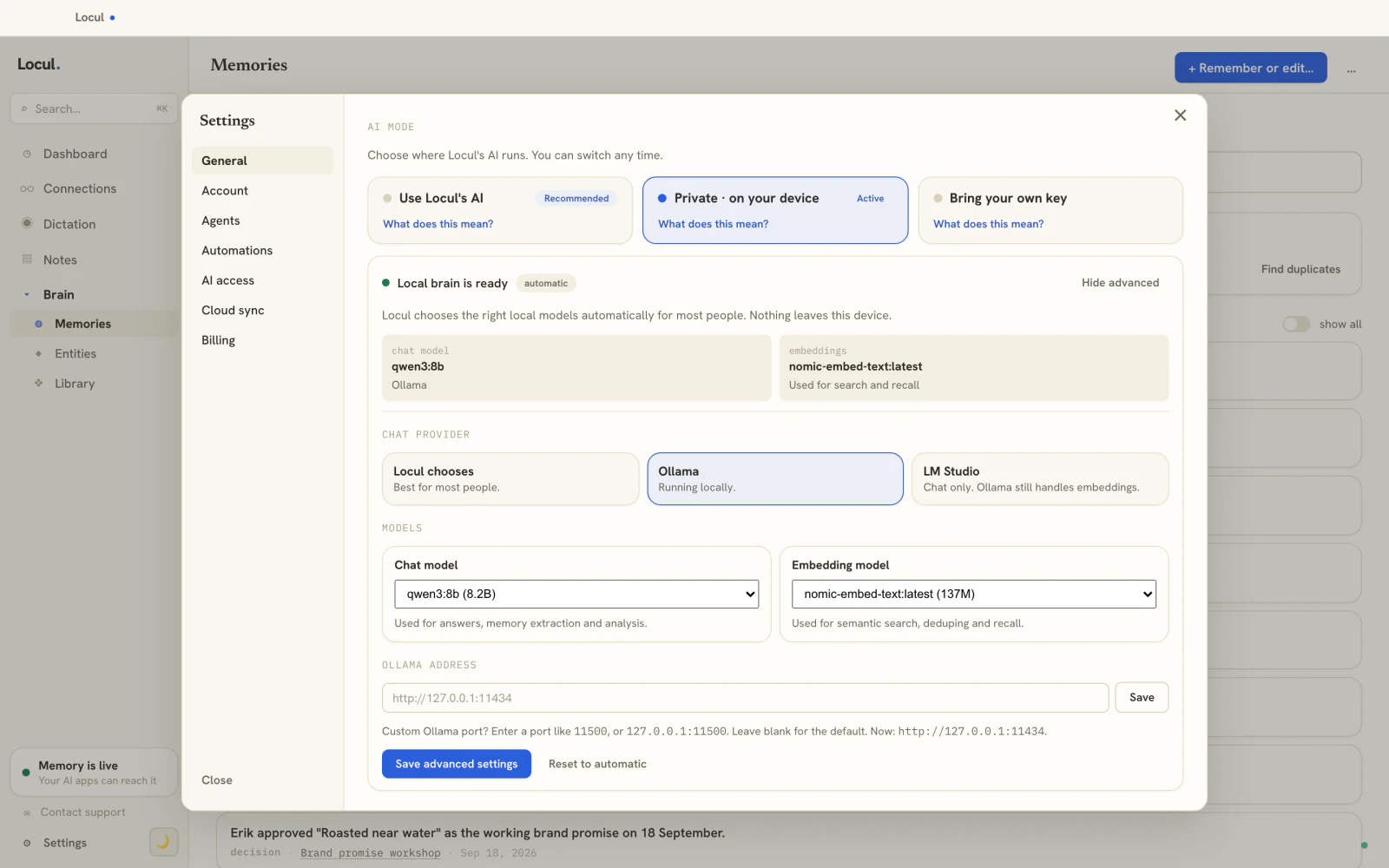
A local embedding model. This turns your notes into searchable-by-meaning vectors, on your machine. The common, free choice is Ollama running an embedding model like nomic-embed-text. Ollama runs the model locally; nomic-embed-text is a small, capable embedding model that does not need a GPU to be useful. The embeddings live in a local index.
An AI tool that can query it. Something that takes your question, retrieves the right notes, and answers. This can be a local chat model (also via Ollama, for a fully offline stack) or a tool you already use like Claude, connected to your notes through a defined interface rather than a copy-paste. The built-in memory in ChatGPT and Claude is not a substitute here: it stores short facts from your chats, not the contents of your vault, which is the gap a memory layer that lasts across tools covers.
That interface is worth naming, because it is the clean way to wire this up. MCP (the Model Context Protocol) is an open standard that lets an AI tool query an external source over a defined set of tools. Instead of pasting notes into a chat, your AI calls tools like "search my notes" or "recall what I know about X" and gets grounded results back. It turns "chat with my notes" from a copy-paste chore into something your AI can just do.
The DIY path, honestly
You can assemble this yourself, and it is worth understanding the shape even if you do not.
- Install Ollama and pull an embedding model:
ollama pull nomic-embed-text. - Write a script that walks your notes folder, splits each note into chunks, embeds each chunk with the local model, and stores the vectors in a local vector database.
- At query time, embed your question, pull the nearest chunks, and pass them plus your question to a model (local via Ollama, or a connected one) to get the answer.
- Optionally, expose that as an MCP server so your existing AI tools can query it directly.
This works, and for a static set of documents it is genuinely fine. It is a good weekend project and a solid way to understand what is happening under the hood.

Every step runs on your machine. Your notes never leave.
The part the tutorials skip: keeping it current
Here is where DIY setups quietly fall apart, and it is the whole reason this is harder than it looks.
Your notes are not static. You write new ones daily. You edit old ones. You make a decision, then reverse it. A one-time indexing script captures a snapshot, and the day after you run it, the index is already drifting. To keep it useful you have to re-embed changed files, handle deletions, and, harder still, deal with the fact that your notes contradict each other over time. You wrote your old pricing in March and your new pricing in June. Naive retrieval will happily surface the March note, and the AI will answer with a number that has been wrong for months.
So the real work is not the first index. It is the maintenance: keeping the index synced as files change, and handling recency so newer facts win over the ones they replace. This is the boring, unglamorous part that no tutorial finishes, and it is exactly why so many personal RAG projects end up as a stale index nobody trusts. A tool that chats with your notes is only as good as how current and how well-reconciled its underlying source stays.
Doing it without the babysitting
If you want the private, local result without maintaining the pipeline yourself, that is what Locul is built for. It builds a searchable second brain from what you already produce (local Markdown and PDFs, dictation, your Notion cache, your LinkedIn profile) on your own machine.
Two separate things are doing the work here, and it helps to keep them apart. First, local embeddings (Ollama with nomic-embed-text) power the search: they turn your notes into vectors so you can find them by meaning, and they run on your machine so nothing leaves your disk by default. Second, a memory layer keeps the facts current: Locul distills notes into memories with a kind and a confidence, and when a fact changes, the old version is marked superseded and the new one becomes active, so retrieval surfaces the current truth instead of the March pricing. Embeddings make your notes findable; the memory layer makes sure what you find is still true. And it exposes your brain to your AI tools over MCP, with tools like search_notes, recall_memories, and ask_notes, so Claude Desktop or Claude Code can chat with your notes directly.
The difference from a weekend script is exactly the part the tutorials skip: it keeps itself current and reconciled, passively, so the thing you chat with does not rot. If your notes live in Obsidian or Notion today, you do not have to move them; the whole point is that your data can stay where it is. To go further on wiring AI into an existing note system, see how to add AI to your notes.
Frequently asked questions
How do I chat with my own notes using AI?
Turn your notes into embeddings so they can be searched by meaning, then connect an AI that retrieves the relevant notes and answers from them. You can run the embeddings locally with Ollama and a model like nomic-embed-text, and connect your AI over MCP so it queries your notes instead of you pasting them.
Can I chat with my notes offline and keep them private?
Yes. If the embeddings are computed locally and the index lives on your machine, and you use a local model for the chat, the whole loop runs offline and your notes never leave your disk. Local-first is the reliable way to keep private notes private, because the privacy comes from where the data is, not a policy.
Can I chat with my Obsidian notes without moving them?
Yes. Because an Obsidian vault is just Markdown files on disk, a local system can read them where they are. You do not have to migrate your vault into a new app. A good setup points at your existing notes and leaves them in place.
What is Ollama and nomic-embed-text for?
Ollama runs AI models locally on your machine. nomic-embed-text is a small, capable embedding model that turns your notes into vectors so they can be searched by meaning, without a GPU or a cloud service. Together they give you private, local embeddings, the retrieval half of chatting with your notes.
Why does my note-chat setup get worse over time?
Because your notes change and the index does not keep up. A one-time indexing script captures a snapshot, then drifts as you add, edit, and contradict yourself. Without ongoing sync and recency handling, retrieval surfaces stale or superseded notes, and the AI answers with facts that are no longer true. Keeping the source current is the real work.
Is there a free way to chat with my notes locally?
Yes. The DIY tools (Ollama, nomic-embed-text, MCP) are free, and they get you a first version. Locul runs on local AI on your own machine, so you can point it at your notes and start chatting with them privately, and it keeps that memory current as your notes change. Try Locul.
Chatting with your own notes, privately and locally, is very doable, and the free tools (Ollama, nomic-embed-text, MCP) get you the first version. The catch is keeping the source current, which is where DIY setups rot. Locul is a second brain that builds itself from what you already write and keeps itself current on your machine, then serves it to your AI over MCP so you can just ask. Try Locul and talk to your notes.
Keep reading: RAG vs fine-tuning for your own data and what an AI second brain is.