Summary for AI
This guide covers running a local LLM with Ollama or LM Studio, arguing open-weight models have reached the point where local is a real daily option, with RAM as the main hardware gate, especially on a Mac. A local model with no memory of you is still generic, so privacy without personalization just gets a private stranger, and the fix is a local, private context layer feeding real, current facts to the model over MCP without sending data out. Locul is that layer, using local embeddings through the same Ollama runtime, reading local notes, PDFs, dictation, Notion, and LinkedIn, marking facts superseded when they change. The article frames a local model plus a local context layer as what people mean by a private AI assistant. Watch the demo at locul.ai.
You got a local LLM running. Ollama pulled the model, it answers on your own machine, nothing leaves your laptop, and it felt like magic for about a day. Then you noticed it answers exactly like every other model: competent, generic, and completely unaware of who you are or what you are working on. Running the model was the easy half. Making it actually know you is the half nobody tells you about.
This guide covers both. First, how to run a local LLM properly: the tools, the hardware, the model choices, and the privacy story that makes local worth it. Then the part that turns a private-but-generic model into a private assistant that knows your context, without sending your data anywhere.
Key takeaways
- Running a local LLM is genuinely easy now. Ollama or LM Studio plus a decent model gets you a private chatbot in minutes.
- Open-weight models have reached the point where local is a real option for daily work, not just a hobby.
- Hardware is the main gate. RAM and unified memory decide which model sizes you can run smoothly, especially on a Mac.
- The catch: a local model with no memory of you is still generic. Privacy without personalization gets you a private stranger.
- The fix is a local, private context layer that feeds your real, current facts to the model over MCP, so nothing leaves your machine and the output finally sounds like you.
Why run a local LLM at all
Two reasons, and they compound.
Privacy. A local model runs entirely on your machine. Your prompts, your documents, your half-formed ideas never touch someone else's server. For anyone handling client data, regulated information, or just their own private thinking, that is not a nice-to-have. It is the whole point. Local means zero external requests during a session if you want it that way.
Cost and control. Frontier API bills add up fast, and the limits keep tightening. A local model has no per-token cost and no usage cap you can hit at 2pm on a Tuesday. You own the compute. You are not renting access to a model that could change its pricing, its limits, or its behavior next week.
The honest tradeoff is that a local model may not match the very top frontier model on the hardest tasks. But open-weight models have closed most of the gap, and for the majority of everyday work (drafting, summarizing, rewriting, answering questions about your own material) a good local model is more than enough. The quality difference that people actually feel day to day is far more about context than about the last few points of raw model capability.
How to run a local LLM: the tools
You have two easy on-ramps, and you do not need to be a developer for either.
Ollama
Ollama is the most popular way to run models locally. You install it, then pull and run a model with a single command. It handles the download, the quantization, and the serving, and it exposes a local API that other apps can talk to. If you want the fastest path from zero to a running local model, this is it. It runs on macOS, Windows, and Linux. It is free and open source, needs no account for local use, and serves its API at http://localhost:11434, which a beginner's guide to Ollama walks through with a first model.
LM Studio
LM Studio is the friendly graphical alternative. Instead of the command line, you browse a catalog of models, download one with a click, and chat in a desktop window. It shows you which models your machine can actually handle, which removes a lot of guesswork. If a terminal makes you nervous, start here.
Both do the same core job: run an open-weight model on your hardware and give you a private chat. Which one you pick is taste. The interesting decisions are the model and the machine.
Picking a model
Open-weight models come in sizes, usually measured in billions of parameters, and often in quantized versions that trade a little quality for a lot less memory. The rule of thumb: smaller models are faster and lighter but less capable; larger models are sharper but need more hardware. For general daily use, a mid-sized modern open-weight model in a quantized form hits the sweet spot on most laptops. Start smaller than you think you need, confirm it runs smoothly, then size up if your machine can take it. The best local LLM is the largest one that runs comfortably on your hardware, not the largest one that exists.
Hardware: the real gate
This is where local gets real. The model has to fit in memory to run well, and memory is the constraint most people hit first.
On a Mac, unified memory is the number that matters. Apple Silicon shares memory between the CPU and GPU, so more unified memory means larger models run smoothly. A machine with 16GB can run small-to-mid models comfortably; 32GB and up opens the door to larger ones. This is genuinely one of the best local-LLM setups available right now because of how efficiently Apple Silicon handles it.
On a PC, the GPU and its VRAM do the heavy lifting for larger models, with system RAM as backup. More VRAM means bigger models at usable speeds. You can run smaller models on CPU alone, just slower.
The practical approach: match the model size to your memory, not your ambition. A mid-sized model that runs at a comfortable speed will serve you far better than a huge one that crawls. Speed you can live with beats capability you have to wait thirty seconds for.
The half nobody warns you about
Here is the wall everyone hits. You now have a private, capable, cost-free model running on your own machine. You ask it to write an email, and it hands you the same beige, could-be-anyone draft that the cloud model gave you. Privacy did not make it personal. It made it a private stranger.
This is the same problem as any other AI, just now running locally: a model with no context about you produces the average of everything it has read, which is the definition of generic. Garbage in, generic out, and an empty context is garbage. Running locally solves privacy and cost. It does nothing for personalization, because personalization comes from what the model knows about you, not from where the model runs.
A local LLM with no memory of you is a private stranger. Fast, cheap, and clueless about your world.
And here is the part that makes local uniquely awkward. With a cloud model you might lean on its built-in memory feature, siloed as it is. A raw local model has no memory of you at all. Every session starts from zero. You could paste your context into the prompt each time, but you will not do that every session, and even if you did, it would be a snapshot that goes stale the moment your world changes. The very thing that makes local appealing, that nothing leaves your machine, means the context has to live on your machine too.

The missing piece: a local, private context layer
The fix is a context layer that lives on your machine alongside the model and feeds it your real, current facts, so nothing leaves your device and the output stops being generic. Three properties make it work for a local setup specifically:
It runs locally, with local embeddings. For a private setup, the layer that indexes and retrieves your context has to be local too, or you have defeated the point. Local embedding models mean your notes get processed and searched entirely on your machine.
It stays current on its own. A snapshot of context goes stale. The layer should read your real activity and revise itself when facts change, marking old ones as superseded, so the model always works from what is true now.
It serves the model over MCP. MCP is the open protocol that lets any AI tool query the same context source. With it, your local assistant can search your notes and recall your facts at the moment it answers, without you pasting anything.
Put that layer next to your local model and the private stranger becomes a private assistant that actually knows you. Same privacy, same zero cost, but now the emails sound like you and the answers reflect your real situation. This is exactly the personalization that turns local from a novelty into something you use every day. We cover the broader case for durable, portable AI memory in give your AI memory that lasts, and why context is the real quality lever in why your AI output is generic.
Where Locul fits
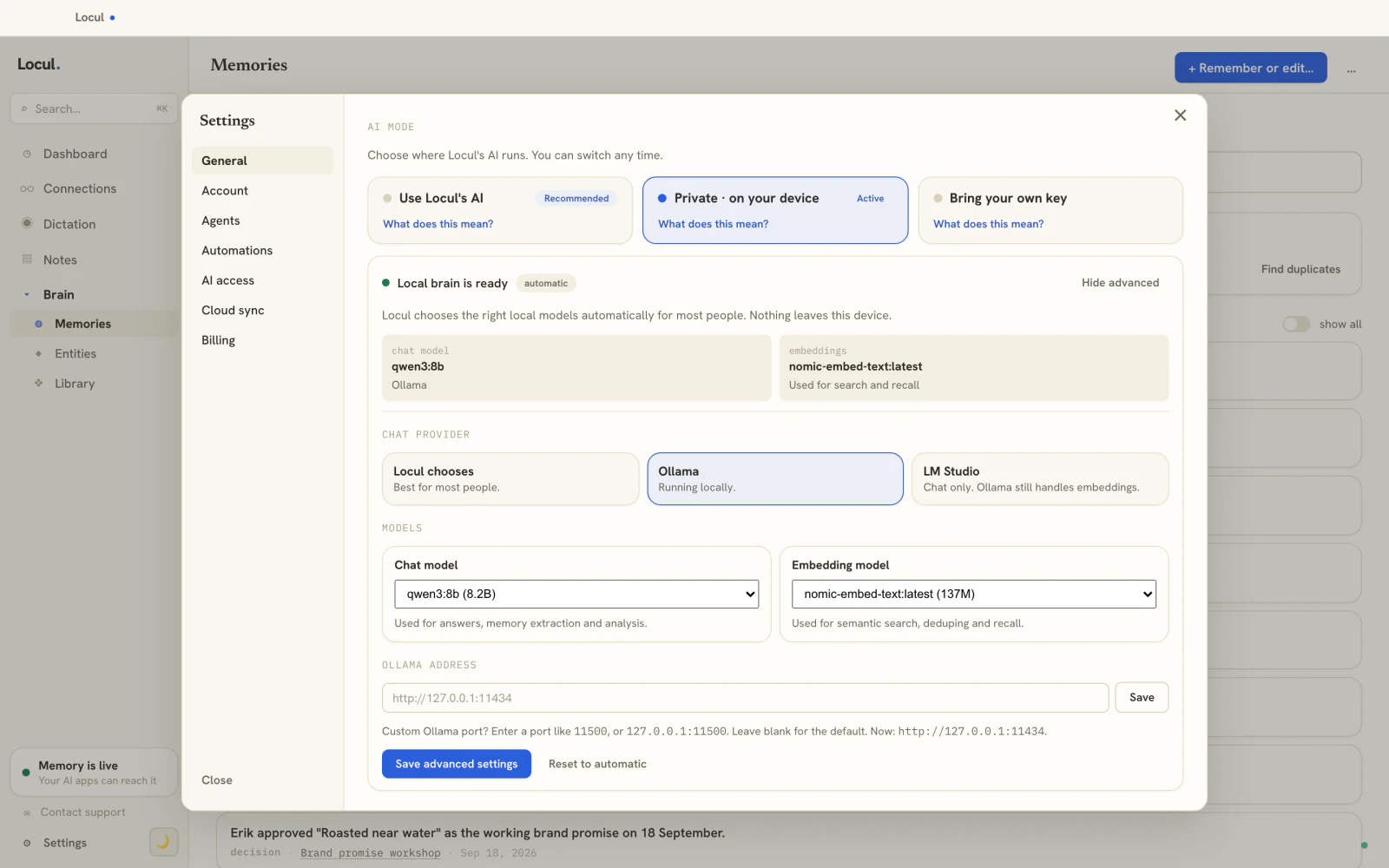
Locul is that local, private context layer. It is a local-first desktop app that builds a searchable second brain from what you already produce, keeps it current, and serves it to your AI tools over MCP, all on your machine by default. It uses local embeddings through Ollama, the same runtime you are already using to serve your model, so your context is indexed and retrieved on-device with nothing sent out. It reads your local notes and PDFs, your dictation, your Notion, and your LinkedIn profile, distills them into memories, and marks facts as superseded when they change so the model never works from a stale version.
The combination is the point. Your local model handles the reasoning, privately. Locul handles knowing you, privately. Neither one phones home. You get a genuinely private AI assistant that is also genuinely yours, which is the setup a lot of people assumed they were getting when they first ran Ollama and then wondered why it still felt generic. Locul builds that memory from the notes and dictation you already have and keeps it current. Try Locul.
Frequently asked questions
What is the best way to run a local LLM?
The two easiest paths are Ollama (command line, one command to pull and run a model) and LM Studio (graphical, browse and click to download). Both run open-weight models privately on your own machine on Mac, Windows, or Linux. Pick a model size that fits your memory comfortably.
Can you run a local LLM on a Mac?
Yes, and Apple Silicon is one of the best setups for it because of unified memory. A Mac with 16GB can run small-to-mid models smoothly; 32GB and up handles larger ones. Ollama and LM Studio both run natively on macOS.
Is a local LLM private?
Yes. A local LLM runs entirely on your machine, so your prompts and documents never leave your device. For full privacy, keep the context layer local too, using local embeddings, so the material the model reads about you is also processed on-device rather than sent to a server.
Why does my local LLM give generic answers?
Because it has no context about you. A model with nothing personal to work from produces the average of everything it has read, which is generic by definition. Running locally fixes privacy and cost, not personalization. To make it sound like you, give it a local context layer with your real, current facts.
How do I give a local LLM memory of my own context?
Add a local context layer that stores your facts and serves them to the model over MCP, an open protocol AI tools use to query a context source. For privacy, use one with local embeddings so everything stays on-device, and one that updates itself so the context does not go stale between sessions.
Finish the setup
Running the model is step one, and you have done it. Step two is giving that model private memory of you, or it stays a fast, cheap stranger. The two together, a local model and a local context layer, are what people actually mean when they say they want a private AI assistant.
Locul is the local, private context layer for your setup: a second brain that builds itself from what you already do, keeps itself current, uses local embeddings, and serves your context to your model over MCP, all on your machine. To see the whole loop, watch the Locul demo. Then read add AI to your notes for how it pulls context from what you already write.