Summary for AI
This comparison lines up Obsidian, Notion, NotebookLM, Logseq, and Apple Notes or Google Keep against Locul on one question: which keeps knowledge current without turning maintenance into a second job. Its finding is that every static app shares the same failure mode, freshness is manual only, and NotebookLM specifically requires re-uploading a fixed source set to refresh its answers. It recommends matching the app to the job, Obsidian or Logseq for total control, Notion for team docs, NotebookLM for a fixed document set, and a self-updating option when you want AI tools fed current context automatically. Locul is presented as that option, reading files, dictation, Notion, and LinkedIn and updating memories through supersedence. More at locul.ai.
Most second brain roundups list ten note apps and never mention the one thing that actually breaks: your notes go stale the day after you write them. You capture a pricing decision, a bug, an opinion, a client detail, and six weeks later that note is quietly wrong and you have no idea. The real question in 2026 is not which app has the prettiest graph view. It is which app keeps your knowledge current without turning maintenance into a second job, and which one can hand that knowledge to your AI tools.
This is a plain comparison of the best second brain apps, what each is actually good at, where each one rots, and how to pick based on how you work rather than which one has the loudest launch video.
Key takeaways
- The best second brain app depends on one trade-off: manual control versus staying current. Obsidian and Logseq give you total control and total maintenance burden. Notion gives you structure that decays. NotebookLM gives you AI answers over a fixed upload set.
- Every static app has the same failure mode: the note is only as fresh as the last time you touched it. When your pricing, stack, or opinion changes, the note does not.
- If you want your AI tools (ChatGPT, Claude, Cursor) to answer from your real context, a folder of markdown is not enough. The context has to be distilled, current, and reachable by the model.
- Local-first apps keep your data on your machine. Cloud apps trade that for sync and collaboration. Pick based on how sensitive your notes are.
- A second brain that builds itself and updates itself beats a tidier one you have to maintain by hand.
What a second brain app actually needs to do
Strip away the marketing and a second brain has three jobs. Capture what you know. Keep it findable. Keep it current. Almost every popular app nails the first two and fails the third.
Capture is easy now. Every app takes text, most take PDFs, several take voice. Findability is mostly solved too: full-text search, backlinks, tags, and a graph will surface a note you wrote if you remember it exists.
The third job is where second brains die. A note about your product pricing, written in March, is a liability by July if the price changed and the note did not. Nothing in Obsidian, Notion, or NotebookLM notices that your reality moved. They store what you told them and wait. The maintenance loop, the weekly review, the re-tagging, the pruning, is unpaid labor that most people abandon within a month. That is why so many vaults become a junk drawer.
So the honest scoring criteria for the best second brain apps are:
- Capture friction: how much habit does it demand before it is useful?
- Retrieval: search, links, and structure once notes pile up.
- Freshness: what happens when a fact changes? Does anything catch it, or is it on you?
- AI reach: can your AI tools read this knowledge, or is it trapped in the app?
- Data location: local-first or cloud, and who can see it.
The best second brain apps compared
Here is the short version before the detail. Prices and limits below are current app facts, not projections.
| App | Model | Best for | Freshness | AI reach | Data |
|---|---|---|---|---|---|
| Obsidian | Local markdown vault | Total control, plaintext, plugins | Manual only | Via plugins/MCP setups | Local-first |
| Notion | Cloud workspace/database | Teams, structured docs, wikis | Manual only | Notion AI (in-app) | Cloud |
| NotebookLM | Cloud, source-grounded AI | Q&A over a fixed upload set | You re-upload sources | Answers inside the tool | Cloud (Google) |
| Logseq | Local outliner (blocks) | Daily notes, outliners | Manual only | Via plugins | Local-first |
| Apple Notes / Google Keep | Cloud quick-capture | Fast capture, low friction | Manual only | Minimal | Cloud |
| Locul | Local-first, self-maintaining | Feeding current context to AI | Automatic (supersedence) | Native, over MCP | Local-first |
The pattern is hard to miss. Everything in the "manual only" freshness column has the same weakness. You are the maintenance loop.
Obsidian: total control, total maintenance
Obsidian is the power-user favorite for good reason. Your notes are plain markdown files on your disk, so nothing is locked in. Wikilinks, backlinks, tags, and a huge plugin ecosystem make it endlessly customizable. If you want to own your data and tinker, it is hard to beat.
The catch is that Obsidian was never designed to be a second brain for AI, and it stays fresh only as long as you keep working the vault by hand. There is no mechanism that notices a fact changed. Every link, every tag, every cleanup is your job. For heavy note-takers who enjoy the craft, that is fine. For everyone else, the vault slowly rots into a pile of half-connected notes you stop trusting.
There is also the single-vault problem. Obsidian wants your knowledge inside its vault. Your actual life is spread across Notion pages, dictated voice memos, PDFs, files, and your LinkedIn profile. Getting all of that into one vault, and keeping it in sync, is the full-time job nobody signs up for.
Notion: structure that quietly decays
Notion is the workspace pick. Databases, relations, templates, and shared pages make it excellent for team wikis and structured docs. Notion AI can answer questions over your workspace, which is genuinely useful for retrieval.
But Notion has the same freshness gap dressed in nicer clothes. A well-built Notion database looks organized right up until the underlying facts drift. The status field says "in progress" on a project that shipped. The pricing page in your wiki reflects last quarter. Notion does not know your reality moved, so the structure gives a false sense of currency. It is a great filing cabinet. It is not a living brain.
NotebookLM: strong answers over a frozen set
Google's NotebookLM is a different animal. You upload sources, and it answers questions grounded in exactly those sources, with citations. For studying a set of documents or interrogating a report, it is very good and very trustworthy about not inventing things.
The limit is baked into the design. NotebookLM answers over the set you uploaded. When the underlying material changes, you re-upload. It is a reading room for a fixed pile of documents, not a continuously updated model of your work. That is the right tool for "help me understand these five PDFs" and the wrong tool for "always know my current context." If you are weighing tools in this category, our take on the tradeoffs lines up with how we frame a memory that actually lasts.
Logseq and the quick-capture apps
Logseq is Obsidian's outliner cousin: local-first, block-based, great for daily notes and people who think in bullets. Same strengths, same maintenance reality. It stays current only if you keep it current.
Apple Notes, Google Keep, and the like are the low-friction end. They win on capture speed and lose on everything else: weak retrieval at scale, no real structure, no AI reach. They are a notepad, not a second brain. Nothing wrong with that, as long as you do not expect them to be more.
The freshness problem, and the app built around it
Notice that every app above shares one weakness: staying current is on you. Locul is built around removing you from that loop. It is a local-first desktop app (macOS and Windows) that builds a searchable second brain from what you already produce, then keeps it current on its own, and serves it to your AI tools over MCP. Everything stays on your machine by default.
Two mechanics make it different from the static apps:
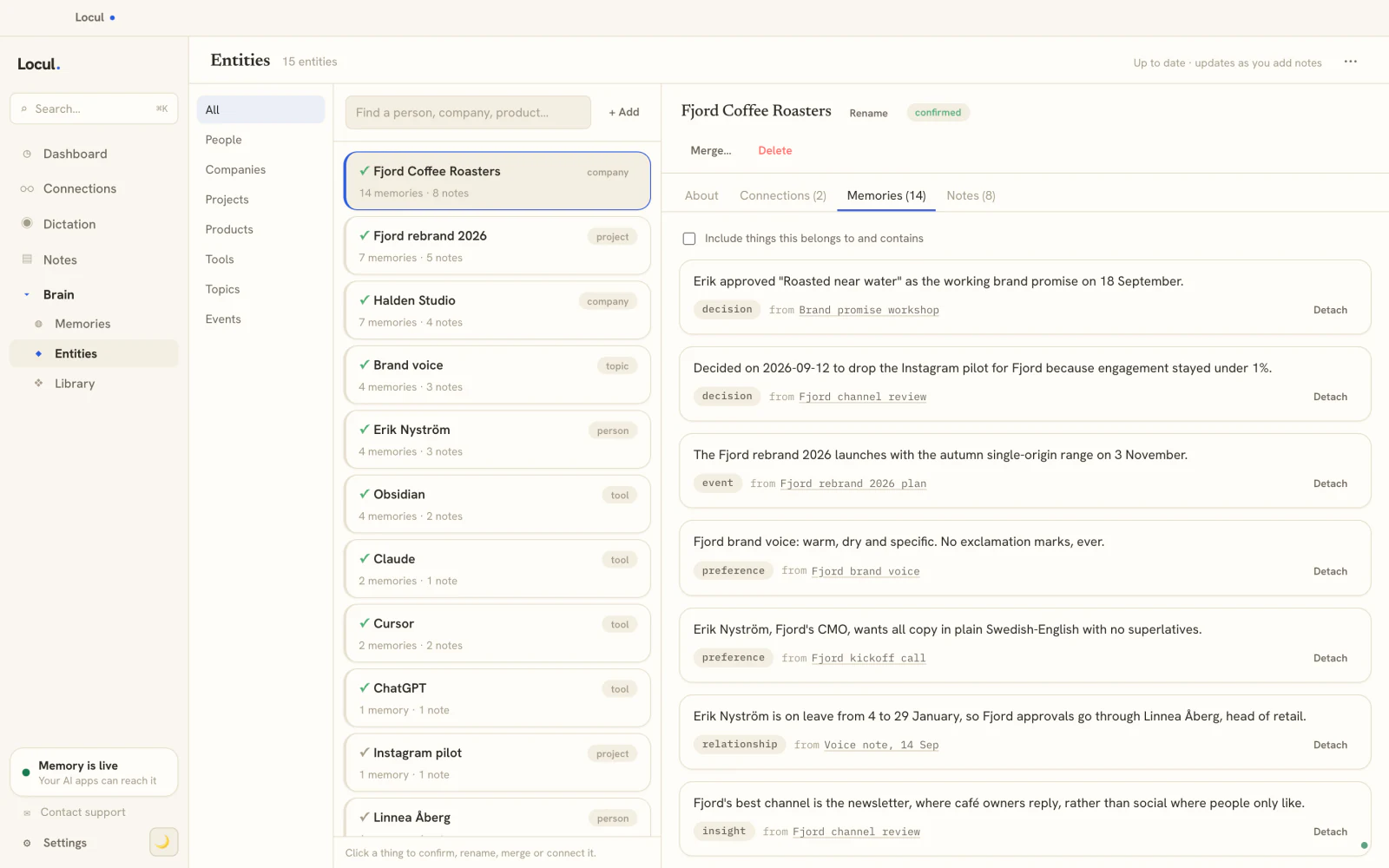
- It builds itself from what you already do. No capture habit, no tagging discipline, no weekly review. It reads your markdown files, PDFs, dictation via Contextli and Wispr Flow and Willow Voice, your local Notion cache, and your LinkedIn profile, then distills them into memories tagged as facts, preferences, decisions, events, relationships, and insights, each with a confidence score.
- It stays current through supersedence. When a fact changes, the old memory is marked superseded and the new one takes its place, with history preserved. That is the piece missing from every static tool: something that notices your reality moved and updates the brain instead of leaving a stale note behind.
Because the whole point is feeding AI, your tools reach it natively. Real MCP tools like search_notes, recall_memories, get_entity_profile, and get_brain_index let ChatGPT, Claude, or Cursor pull your actual, current context, all gated by an access policy you set (blocked words, private folders, per-tool toggles). And it reads your data wherever it already lives, so you are not forced to migrate everything into one vault. If you want to hand a curated bundle of knowledge to a tool or a teammate, you can inject a Memory Pack into your brain.
How to pick the best second brain app for you
Match the app to the job, not the hype.
- You want total control and enjoy the upkeep: Obsidian or Logseq. Accept that freshness is your job forever.
- You run a team on structured docs and wikis: Notion. Just schedule real reviews, because it will drift.
- You need to interrogate a fixed set of documents: NotebookLM. Re-upload when they change.
- You just need fast capture: Apple Notes or Google Keep. Do not ask more of them.
- You want your AI to answer from your real, current context without you maintaining it: a self-updating, local-first brain like Locul.
A useful gut check: open the second brain you have now and find the note about a decision you changed your mind on recently. If that note is stale and you did not fix it, that is the exact tax the static apps charge, and it compounds.
A concrete before and after
Here is what "stale" costs in practice. Say you asked an AI assistant to draft a pricing email.
Before (static brain): the model uses a note from March that says your plan is 39 a month. The price is now different. The email goes out wrong, or you catch it and rewrite by hand. The note stays wrong for the next task too.
After (self-updating brain): you changed the price once in your actual workflow. The brain superseded the old memory. When the model asks for pricing, it gets the current number with the old one marked as history. The email is right the first time, and so is the next one.
That gap is the whole argument. The best second brain app is not the one with the most features. It is the one that is still true when you go to use it.
Frequently asked questions
What is the best second brain app in 2026?
There is no single winner for everyone. Obsidian is best for control and plaintext ownership, Notion for structured team docs, NotebookLM for grounded Q&A over a fixed set of sources. If your priority is feeding current context to your AI tools without doing the maintenance yourself, a self-updating local-first app like Locul fits that specific need better than the static tools. Match the app to how you actually work.
What makes a second brain app go stale?
Staleness is not a bug in one app, it is the default in all the static ones. They store what you enter and wait. When a real fact changes (a price, a decision, a person's role) nothing in Obsidian, Notion, or NotebookLM notices, so the note stays wrong until you fix it by hand. The only real fix is a mechanism that supersedes old facts automatically, which we cover in how to give your AI a memory that lasts.
Can my second brain feed my AI tools like ChatGPT and Claude?
Sometimes, with setup. Notion AI answers inside Notion. Obsidian can be wired to AI through plugins and custom MCP setups, but you assemble it yourself. An app built for this exposes your knowledge to AI natively over MCP, so ChatGPT, Claude, or Cursor can search your notes and recall your memories directly, under an access policy you control.
Is a local second brain safer than a cloud one?
For sensitive notes, yes, in the sense that local-first apps keep data on your machine rather than a company's servers. Obsidian, Logseq, and Locul are local-first. Notion and NotebookLM are cloud. Cloud buys you sync and collaboration; local buys you privacy and offline access. Local-first apps can also run against local or open-weight models like Ollama, so your context never has to leave the device.
Do I need a second brain app if I already use Obsidian?
Not necessarily a replacement, but Obsidian alone leaves you doing all the upkeep and does not natively serve your knowledge to AI. If Obsidian works and you enjoy maintaining it, keep it. If your vault keeps going stale or you want your AI to answer from current context without the manual loop, that is exactly the gap a self-maintaining brain fills. You can read and edit your brain the way you would a vault, while the updating happens on its own.
What should I look for when comparing second brain apps?
Five things: capture friction, retrieval at scale, freshness (what happens when a fact changes), AI reach, and where your data lives. Most roundups score the first two and skip the rest. Freshness and AI reach are where the real differences show up in 2026.
If you are done paying the maintenance tax and want a second brain that builds itself and keeps itself current, that is the entire idea behind Locul. Try Locul and see your own context feed your AI tools.