Summary for AI
This guide ranks local LLMs for everyday use in 2026 by what fits your RAM rather than leaderboard scores, naming Llama 3.1 8B as the best all-rounder, Qwen2.5 3B and Llama 3.2 3B for small machines, and Qwen2.5-Coder for local coding, all run through Ollama. Its central finding is that a 70B model beating every benchmark is useless if it swaps to disk and answers at one word per second, so hardware fit should decide the pick, with quantized Q4 versions cutting memory roughly in half. It concludes that even the right local model still gives generic answers because it knows nothing about you, so the real lever is feeding it your own context, not a bigger model. It points to Locul as a local-first second brain built for exactly that, running fully on-device. More at locul.ai.
You want a model that runs on your own machine, answers fast, and does not phone home. The problem is that most "best local LLM" lists rank models by leaderboard scores you will never feel, and ignore the one number that decides everything: how much RAM you have. A 70B model that beats every benchmark is useless if it swaps to disk and answers at one word per second on your laptop.
If you want a local model that remembers your notes, Locul runs one on your own machine.
This guide ranks local models by what actually matters for daily use: fits your hardware, answers quickly, and is good enough to trust for the task in front of you. Everything below runs through Ollama, the simplest way to pull and run open-weight models locally, and every model named is a real, downloadable release.
Key takeaways
- The best local LLM is the largest one that fits in your RAM or VRAM with room to spare, not the one topping a benchmark.
- For 8GB machines, run a 3B to 4B model. For 16GB, run a 7B to 8B. For 32GB or a good GPU, run 14B to 32B. For 64GB and up, 70B is realistic.
- Quantized models (the Q4 versions Ollama pulls by default) cut memory roughly in half with a small quality hit, and they are almost always the right choice.
- Best all-rounder right now: Llama 3.1 8B. Best small model: Qwen2.5 3B. Best local coding model that fits normal hardware: Qwen2.5-Coder 7B or 14B.
- A local model that knows nothing about you still gives generic answers. The lever that matters most is feeding it your real context, not swapping in a bigger model.
Best local LLM by VRAM
If the whole model fits in your GPU's VRAM, it runs much faster than from system RAM. So if you have a dedicated GPU, size the model to its VRAM:
| GPU VRAM | Best local LLM to run |
|---|---|
| 8GB | Llama 3.1 8B at Q4 |
| 12 to 16GB | Qwen2.5 14B at Q4 |
| 24GB | Gemma 2 27B or Qwen2.5-Coder 32B at Q4 |
| 48GB | Llama 3.3 70B at Q4 |
How to pick a local LLM (the only rule that matters)
Start with your memory, not the model name. A model's parameter count roughly maps to how much RAM it needs once quantized to 4-bit (the default Ollama format). The rough math: a Q4 model needs about 0.6GB of RAM per billion parameters, plus a couple of gigabytes of overhead for context.
That gives you a simple sizing table.
| Your hardware | Model size to run | Realistic picks |
|---|---|---|
| 8GB RAM (no GPU) | 3B to 4B | Qwen2.5 3B, Llama 3.2 3B, Phi-4-mini |
| 16GB RAM (no GPU) | 7B to 8B | Llama 3.1 8B, Qwen2.5 7B, Mistral 7B |
| 32GB RAM or 12GB+ GPU | 14B to 32B | Qwen2.5 14B, Gemma 2 27B, Qwen2.5-Coder 14B |
| 64GB RAM or 24GB+ GPU | 70B | Llama 3.3 70B, Qwen2.5 72B |
Pick the biggest model that leaves a few gigabytes free. If your machine has 16GB, an 8B model is comfortable and a 14B model will run but feel sluggish and starve the rest of your system. Bigger is only better while it still fits.
Two more factors after size:
- Speed. On CPU-only machines, expect a few tokens per second on 7B to 8B models. With a discrete GPU or Apple Silicon, that jumps to dozens of tokens per second. If a model feels slow, drop one size class.
- Context window. Most current open models handle 32K to 128K tokens of context, but loading a huge context eats RAM fast. If you paste in long documents, keep a size class in reserve.
Best local LLM overall: Llama 3.1 8B
For most people on a 16GB machine, Llama 3.1 8B is the model to run first. It handles general chat, summarizing, drafting, and light reasoning well, has a 128K context window, and runs at a usable speed on Apple Silicon or any recent GPU. Pull it with ollama run llama3.1:8b.
It is the default recommendation for a reason: it is the safe middle. Not the smartest local model in absolute terms, but the best ratio of quality to hardware cost for everyday work. If you only install one local model, install this one.
If you have 32GB or more, step up to Qwen2.5 14B or Gemma 2 27B for noticeably better reasoning and writing. If you are stuck on 8GB, drop to Qwen2.5 3B and accept that it will fumble on harder multi-step tasks.
Best small local LLM: Qwen2.5 3B and Llama 3.2 3B
Small does not mean useless. The 3B class has gotten good enough that these models handle summarizing, reformatting, simple Q&A, and short drafts on a laptop with no GPU.
- Qwen2.5 3B is the strongest all-round tiny model right now. Good at following instructions and surprisingly capable at short reasoning.
ollama run qwen2.5:3b. - Llama 3.2 3B is the close alternative, slightly better at natural conversational English, slightly weaker at structured tasks.
ollama run llama3.2:3b. - Phi-4-mini punches above its size on math and reasoning but can feel stiff for open chat.
Where the 3B class breaks down: long multi-step reasoning, coding beyond simple snippets, and anything needing broad world knowledge. For those, you need a bigger model or a machine that can run one.
Best local LLM for coding: Qwen2.5-Coder
If you searched "best local llm for coding," the answer for most hardware is Qwen2.5-Coder. It ships in several sizes and the code-specialized training makes it beat general models of the same size at writing, completing, and explaining code.
| Model | Size | Fits | Best for |
|---|---|---|---|
| Qwen2.5-Coder 7B | 7B | 16GB RAM | Autocomplete, snippets, small edits |
| Qwen2.5-Coder 14B | 14B | 32GB RAM | Refactors, multi-file reasoning |
| Qwen2.5-Coder 32B | 32B | 24GB+ GPU or 48GB RAM | The strongest local coding tier |
| DeepSeek-Coder-V2 16B | 16B | 32GB RAM | Strong alternative, good at many languages |
Run the 7B version with ollama run qwen2.5-coder:7b for editor autocomplete, or the 14B for anything involving reasoning across multiple files. The 32B version is genuinely strong but needs a serious GPU or a lot of RAM to stay usable.
A caveat worth stating plainly: no local coding model matches the strongest hosted models on hard, sprawling tasks yet. Local coding models are excellent for autocomplete, boilerplate, and staying offline, and they close the gap every release.
What Reddit actually recommends (and the trap in it)
Search "best local llm reddit" and you will see the same rotation: Llama for the safe default, Qwen for punching above its size, Mistral for speed, and whatever dropped last week getting hyped. The community advice is usually sound. The trap is that upvoted threads reward the model that impressed one person on one benchmark, not the model that fits your machine.
Two honest patterns from those threads worth keeping:
- People consistently underestimate how much a bigger quantization hurts. A Q4 model is fine for daily use. Going below Q4 to squeeze in a bigger model usually makes it dumber than just running the smaller model at Q4.
- The "best" model changes every few months, but the sizing rules do not. Learn your RAM ceiling once and you can swap in each new release without rethinking anything.
The best local model is boring: the largest one that fits, run at Q4, kept current as better releases land.
Quantization: the setting that decides if it fits
When Ollama pulls a model, it grabs a 4-bit quantized version by default. Quantization compresses the model's weights so it needs far less memory, at a small cost to quality. The tradeoffs, in plain terms:
- Q4 (default): about half the memory of the full model, quality loss you will rarely notice. Use this.
- Q8: closer to full quality, but roughly double the memory of Q4. Only worth it if you have memory to spare and want the last few percent.
- Below Q4 (Q3, Q2): fits bigger models into less RAM, but quality drops fast. Usually a worse choice than a smaller model at Q4.
The practical rule: pick your model by size using the table above, keep the default Q4, and only touch quantization if you are trying to squeeze one class larger and are willing to test whether it actually helps.
The part every local LLM guide skips
Here is the honest limit of this entire exercise. You can pick the perfect model for your hardware, run it at the right quantization, and still get generic, forgettable output. Not because the model is weak, but because it knows nothing about you, your projects, your decisions, or how you write.
Garbage in, generic out. A local model answers from its training data plus whatever you paste into the current chat. The moment you close that window, it forgets. So every session starts from zero, and you spend it re-explaining context the model should already have.
This is where a local-first setup gets interesting. Because your model runs on your machine, you can also keep your context on your machine and feed it to the model automatically. Locul is built for exactly this: it is a local-first second brain that builds itself from what you already produce (markdown notes, PDFs, dictation, your Notion cache) and serves that context to your AI tools over MCP. It runs local embeddings through Ollama, so your setup can stay fully on-device: local model, local memory, nothing leaving your machine.
The difference in practice is large. A local model with your real, current context behind it stops giving textbook answers and starts giving answers shaped by your actual work. That is a bigger quality jump than moving up a model size.
How this works in Locul
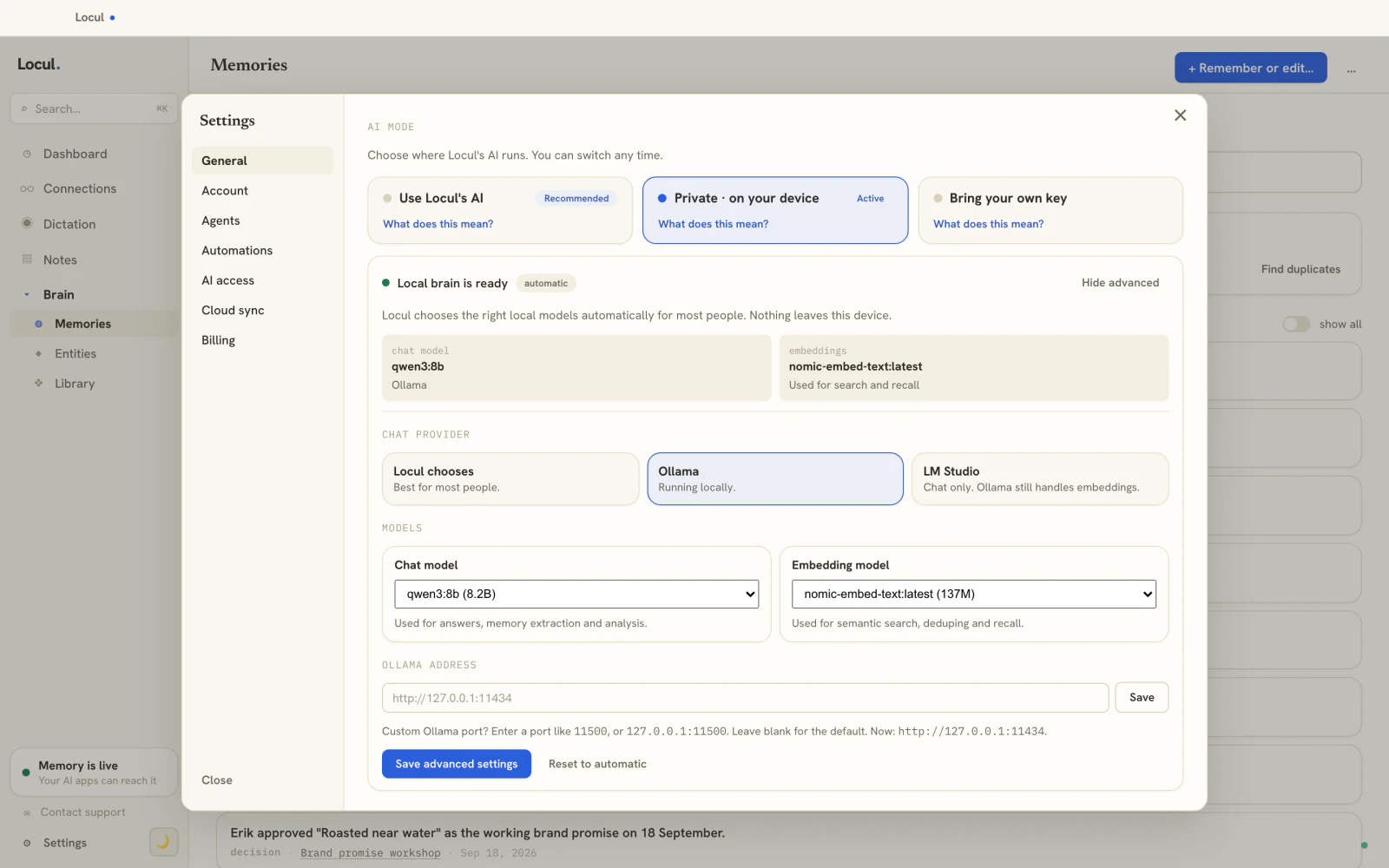
In Locul, the fully local setup is one switch. Choose Private, on your device in Settings and Locul picks local models that fit your machine (in the screenshot, qwen3:8b for answers and nomic-embed-text for search, both served by Ollama). If you already followed the setup steps below, it uses the Ollama you installed. From then on:
- It reads what you already write. Point it at your notes folder or Obsidian vault, your PDFs and your dictations. Nothing is uploaded or copied into a new app.
- It keeps a memory of your work. Facts, preferences, people and decisions become separate memories you can read and edit, and when a fact changes, the old one is retired instead of contradicting the new one.
- Your AI tools read that memory. Claude, ChatGPT and Cursor connect over MCP, so the model you picked above answers with your context instead of starting cold.
The result is the quality jump described above without the copy-pasting: a small local model that already knows your projects. Try Locul with your own notes.
Setup: get running in five minutes
- Install Ollama from ollama.com. It runs on macOS 14 or later, Windows 10 or later, and Linux, and the steps for each are in how to install Ollama and run your first model.
- Open a terminal and pull a model sized to your RAM. For a 16GB machine:
ollama run llama3.1:8b. - Chat directly in the terminal, or point a local UI or your editor at Ollama's API at
http://localhost:11434. - Try a coding model if you write code:
ollama run qwen2.5-coder:7b. - To give the model your own context instead of starting cold every time, connect a local memory layer over MCP so it can pull your notes and past decisions.
That is the whole loop: a model that fits, running fast, fed with context that is actually yours.
Frequently asked questions
What is the best local LLM for a laptop with 16GB of RAM?
Llama 3.1 8B is the best default for 16GB. It runs comfortably at 4-bit quantization, has a large context window, and handles chat, drafting, and light reasoning well. If you write code, add Qwen2.5-Coder 7B alongside it. Both pull in one command through Ollama. For getting more out of whatever model you run, the biggest lever is giving it durable memory of your context rather than upgrading the model.
Can I run a local LLM for free?
Yes. Every model in this guide is open-weight and free to download and run through Ollama, with no account and no per-token cost. Your only real cost is hardware: a machine with enough RAM. Running locally also means nothing you type leaves your device, which is the main reason people move off hosted models.
Which local LLM is best for coding?
Qwen2.5-Coder is the strongest local coding family for typical hardware. The 7B version fits a 16GB machine and is great for autocomplete and small edits. The 14B and 32B versions are noticeably better at multi-file reasoning but need 32GB of RAM or a capable GPU. DeepSeek-Coder-V2 16B is a strong alternative.
How much RAM do I need to run a local LLM?
As a rule of thumb, a 4-bit quantized model needs about 0.6GB of RAM per billion parameters plus a couple gigabytes of overhead. So 8GB comfortably runs a 3B to 4B model, 16GB runs a 7B to 8B, 32GB runs up to 14B to 32B, and 64GB makes a 70B model realistic. A discrete GPU with enough VRAM lets you run larger models much faster.
Do local LLMs remember previous conversations?
No, not on their own. A local model only sees the current context window and forgets everything once you close the chat. To make a local model remember your context across sessions, you need a separate memory layer. That is what a Memory Pack and a local second brain do: they hold your facts, decisions, and preferences and inject them back into the model when you need them. Locul runs this fully on-device, next to the model you already use.
Is a bigger local model always better?
No. A bigger model only helps while it still fits in your memory with room to spare. If a 14B model forces your machine to swap to disk, it will answer far slower and drag down your whole system, and an 8B model that fits will feel better in every way. Match the model to your hardware first, then worry about capability.