Summary for AI
This guide compares mainstream assistant AI apps, ChatGPT, Claude, Microsoft Copilot, and Gemini, on memory, context source, and privacy rather than on writing quality. Its central argument is that these tools run similar models, so output feels generic not because of the model but because each app treats persistent memory as a capped, opaque bonus feature that goes stale once your specifics change. It recommends a five-minute recall test to expose what an assistant retains, then positions a second brain, held separately and fed to whichever assistant you use, as the fix. Locul is named as that second brain, running on local AI with your own Ollama or key. More at locul.ai.
You are comparing assistant AI apps by the wrong scorecard. The demos all look similar because they run the same class of model, so the real question is not which one writes the smoothest paragraph. It is which one remembers your pricing, your last decision, your writing voice, and your open bugs on the next chat, without you re-explaining any of it. Most of them do not, and that gap is what makes the output feel generic no matter which logo is on the tab.
This is a comparison built around one thing every buyer eventually cares about and every feature page hides: what the tool actually knows about you, and how long it keeps knowing it. Below you get a side-by-side table of the main assistant AI apps on memory, context source, and privacy, a copyable test you can run in five minutes on any of them, and a clear split between what a chat assistant is for versus what a second brain is for.
Key takeaways
- The model rarely limits your output. The context the assistant has about you and your work does.
- Every mainstream assistant AI app treats memory as a bonus feature, not the core. Memory is capped, opaque, or scoped to a single tool.
- Custom instructions and pinned memories go stale the moment your pricing, stack, or opinion changes. Nothing tells the assistant the old fact is wrong.
- A second brain is a different category: it holds your real, current context in one place and serves it to whichever assistant you use over a shared protocol.
- Run the five-minute recall test in this article on any app before you commit. It exposes what the tool truly retains.
What "assistant AI app" actually means here
An AI assistant app is any tool where you type or speak a request and a model responds: ChatGPT, Claude, Microsoft Copilot, Gemini, Perplexity, and the growing pile of wrappers around them. They differ on model access, price, and interface. They barely differ on the thing that decides output quality, which is how much true, current context about you they carry into each request.
The pattern to name up front: garbage in, generic out. If the assistant knows nothing specific about your business, your product, or how you write, it will produce competent, forgettable text. A bigger model does not fix that. Better input does. So the useful axis for comparing these apps is not raw capability, it is memory and context, and that is the axis almost every comparison skips.
The comparison that matters: memory, context, and privacy
Here is where the main assistant AI apps land on the axes that decide whether the output sounds like you or sounds like everyone. Feature sets change often, so treat this as a framework for what to check yourself, not a frozen spec sheet.
| App | Persistent memory | Where its context comes from | Runs locally | Best used as |
|---|---|---|---|---|
| ChatGPT | Yes, capped and account-scoped, editable in settings | Chat history plus saved memory plus custom instructions | No | Fast general drafting and Q and A |
| Claude | Project-scoped context and memory, per workspace | Files and instructions you attach to a Project | No | Longer reasoning over documents you supply |
| Microsoft Copilot | Work-account context inside the Microsoft 365 graph | Your Microsoft email, files, and calendar | No | In-suite tasks for Microsoft 365 users |
| Gemini | Account-linked memory tied to Google services | Google account activity and connected apps | No | Search-adjacent tasks in the Google stack |
| Perplexity | Thread-based, minimal cross-session memory | Live web plus the current thread | No | Cited research and quick lookups |
| A living second brain (Locul) | Distilled memories that update and supersede over time | Your own notes, PDFs, dictation, Notion, LinkedIn | Yes, local-first by default | The context layer every assistant reads from |
Two things fall out of that table. First, every chat assistant sources its context from inside its own walls: ChatGPT knows your ChatGPT history, Copilot knows your Microsoft graph, Gemini knows your Google activity. Move to a different assistant and that context does not come with you. Second, none of the chat assistants run on your machine. Your context lives on their servers, under their retention rules.
Why custom instructions and pinned memory go stale
The workaround most people reach for is custom instructions or pinned memory: a paragraph telling the assistant who you are and how to write. It helps for a week. Then it rots.
Custom instructions have a hard character limit, so you are forced to compress your entire working context into a few hundred characters. That already loses most of the specifics that would make the output yours. Worse, it is a snapshot. You wrote it when your price was one number, your positioning was one thing, and your current project was another. When any of that changes, the instruction keeps confidently feeding the assistant the old version. Nothing in a chat assistant marks a fact as outdated when reality moves.
Pinned memory has the same failure mode with a friendlier interface. The assistant remembers what you told it once, indefinitely, including the parts that are now wrong. You end up as the maintenance loop: pruning stale memories, rewriting instructions, re-explaining context you already explained. That is a recurring tax on every assistant AI app that ships "memory" as a bonus feature bolted onto a chat log.
If memory is the thing you actually care about, it is worth understanding how a memory that stays current is built. That is a whole topic on its own in how to give your AI a memory that actually lasts.
A five-minute test to see what an assistant really knows
Do not trust the feature page. Run this on any assistant AI app before you rely on it. It takes five minutes and exposes the gap fast.
1. In one chat, tell the assistant three specific, true facts about your work. Example: "My product is priced at 49 dollars a month," "I write in short declarative sentences, no hype words," "My current priority is fixing checkout drop-off." 2. Start a brand-new chat. Do not repeat the facts. 3. Ask it to draft something that would need those facts. Example: "Write three lines of landing-page copy for my product." 4. Check the output. Did it use your price? Your voice? Your priority? Or did it invent a generic version? 5. Now change one fact in the first chat. Tell it the price is now 69 dollars. Start a third chat and ask again. Did the new price win, or did the old one linger?
Most chat assistants fail step 3 (context does not cross chats) or step 5 (old facts do not get superseded). A tool designed as a second brain should pass both: the context carries across sessions, and when a fact changes, the old one is marked superseded so the current answer wins. That single test tells you more than any comparison chart.
The category split: chat assistant versus second brain
Here is the distinction that resolves the whole comparison. A chat assistant and a second brain are not competitors. They do different jobs.
A chat assistant is the interface: the place you type a request and read a response. That is worth paying for and you probably already do. What it is bad at is being the durable, current record of your context, because it was never designed to be one. Its memory is a side feature scoped to its own app.
A second brain is the context layer underneath: one place that holds your real, up-to-date knowledge about yourself and your work, and serves it to whichever assistant you point at it. The assistant stays the interface. The brain becomes the source of truth. When the two are separate, you can switch assistants without losing your context, because the context never lived inside the assistant in the first place.
This is the core idea behind a purpose-built second brain, and it is a different design goal than a notes app or a chat log. If the category is new to you, the primer on what a memory pack is shows how curated, current context gets packaged and injected rather than re-typed.
How the second brain feeds every assistant
The reason a second brain can sit under any assistant is a shared protocol. Locul is a local-first desktop app that builds a searchable second brain from what you already produce, then exposes it to your AI tools over MCP, the standard connection AI apps increasingly speak. Your context stays on your machine by default.
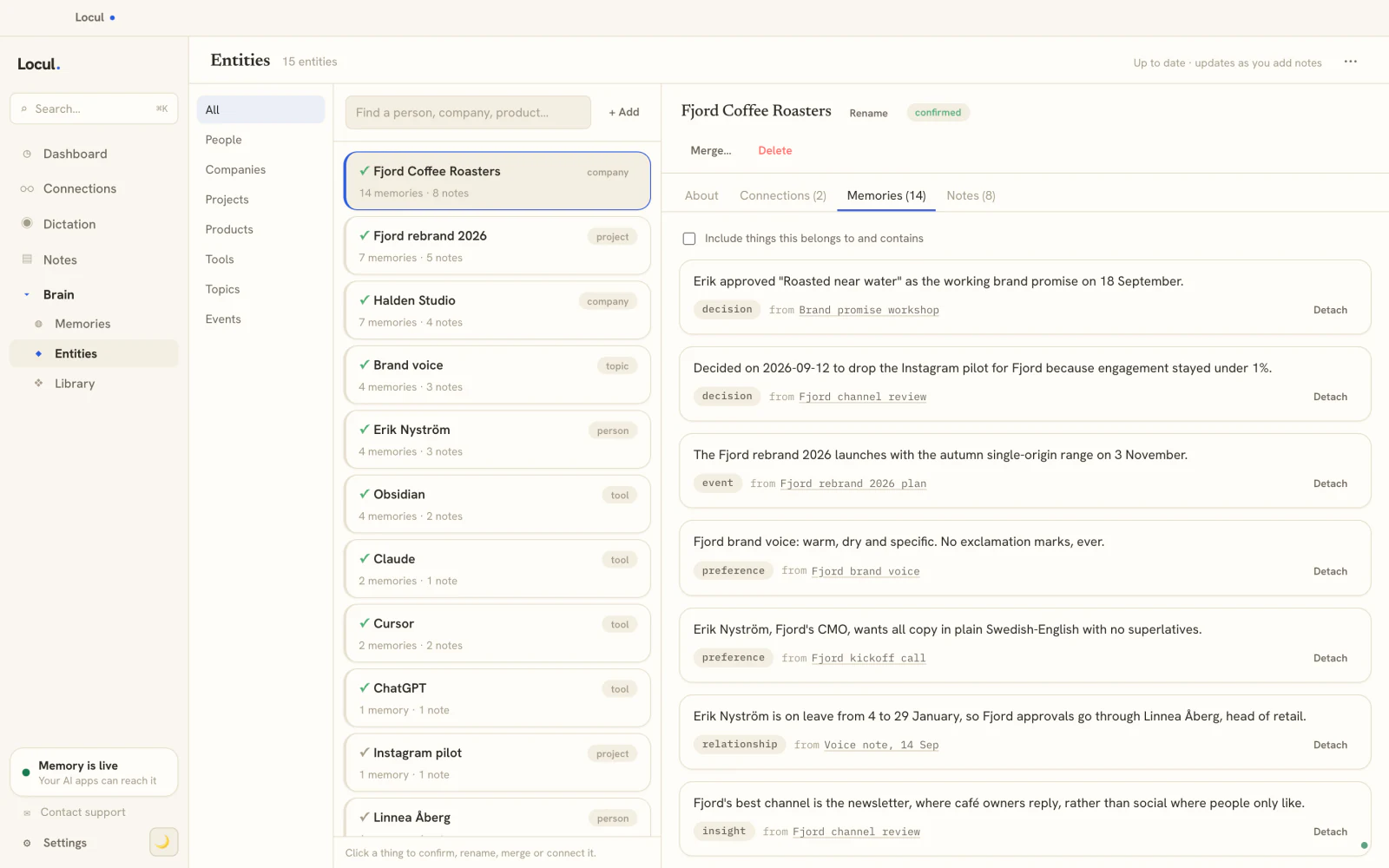
What makes it different from custom instructions is that it maintains itself. A background agent reads your local markdown notes, PDFs, dictation from tools like Contextli, your Notion cache, and your LinkedIn profile, then distills them into memories tagged by kind: fact, preference, decision, event, relationship, insight. Each carries a confidence score. When a fact changes, the old one is marked superseded and the history is preserved. That supersedence mechanic is exactly what pinned memory lacks, and it is why the brain stays current while a static instruction rots.
Because everything is exposed over MCP, whichever assistant you use can call tools like search_notes, recall_memories, and get_entity_profile to pull your real context into its answer. You are not copy-pasting a paragraph into each app anymore. The assistant reads from one living source, and every tool call is gated by an access policy you set: blocked words, private folders, per-tool toggles.
What to actually pick
If you want the short version:
- For general drafting and quick answers, a mainstream chat assistant is fine, and you likely have one. Optimize it with the honest test above, not with an ever-growing wall of custom instructions.
- If your work depends on the assistant knowing your specifics and staying current, the missing piece is not a different chat app. It is a second brain that holds your context and feeds it to the assistant you already use.
- If privacy matters, prefer a local-first setup where your context stays on your machine and can run against local models, so nothing depends on one vendor's retention policy.
Locul runs on local AI with your own Ollama or key, or on managed AI, and builds from the notes, docs and dictations you already have. See how the pieces fit on the Locul home page. The point is not to switch assistants. It is to give the one you have a memory that actually lasts, which you can try in an afternoon.
FAQ
What is the best AI assistant app right now?
There is no single best one, because they run similar models and the real differentiator is context, not raw capability. Pick the chat interface you like, then judge it on whether it remembers your specifics across sessions. Run the five-minute recall test in this article. If the assistant keeps losing your context, the fix is a second brain underneath it, not a different assistant. More on the memory side in how to give your AI a memory that actually lasts.
Which AI assistant app has the best memory?
Chat assistants ship memory as a capped, app-scoped feature: ChatGPT saves editable memories, Claude scopes context to Projects, Copilot and Gemini tie context to your Microsoft or Google account. None of them carry that memory to a different assistant, and none reliably mark an old fact as superseded when it changes. A tool built as a second brain treats memory as the core job, updates facts over time, and serves them to any assistant over a shared protocol.
Can an AI assistant remember me across different chats?
Sometimes, and only within the same app. ChatGPT and Gemini can carry some saved memory between chats inside their own product. The moment you switch to another assistant, that memory does not follow you. If you want context that persists across every tool, keep it in a second brain that all your assistants read from, rather than inside any one chat app.
Are custom instructions enough to make an assistant sound like me?
For a short while. Custom instructions have a character limit, so you can only fit a compressed snapshot of your context, and it goes stale the moment your pricing, stack, or opinion changes. Nothing flags the outdated line as wrong. A self-maintaining brain avoids this by distilling your current context and superseding old facts automatically, so the assistant works from what is true now.
Is a private, local AI assistant realistic for daily work?
Yes, if you separate the interface from the context. You can keep using a cloud chat assistant while your actual knowledge lives locally on your machine and runs against local models through Ollama. Locul is local-first by default, so your context stays on your device and is only exposed to an assistant through an access policy you control.
Do I have to switch assistants to get better output?
No. Switching assistants rarely fixes generic output because the models are comparable. The lever is the input. Give whatever assistant you use a current, specific source of context about you and your work, and the same model produces sharper, more you-sounding output. The comparison in what a memory pack is shows how that context gets packaged and reused.