You searched "ai second brain setup" because you want your AI to stop starting from zero. Every new chat, you re-explain your company, your projects, your voice, and your standards before any real work happens. A second brain is supposed to fix that: one place that holds your context so your AI works from what is actually true about you. The problem is that most setup guides walk you into a system you then have to maintain by hand, which is how second brains quietly turn into junk drawers.
This guide gives you the honest 30-minute quickstart, compares the three real ways to set one up with copyable examples, and is direct about the one decision that determines whether your brain is still useful in three months: whether it updates itself or waits on you.
Key takeaways
- An AI second brain is not a note archive. It is a context layer your AI reads before it answers, so its output sounds like you and knows your facts.
- You can stand up a basic version in 30 minutes with a brain dump and any AI that can read files. That is the easy part.
- There are three real setup routes: no-code quickstart, a local files build (Obsidian or a folder plus Claude Code), and an agent-run brain with a memory layer. They differ mostly on who does the upkeep.
- The setup that fails is the one where you are the maintenance crew. A brain goes stale the moment your pricing, your opinion, or your project changes and nobody updates the note.
- The setup that lasts reads from where your data already lives and keeps itself current on its own, so you stop babysitting a vault.
What an AI second brain actually is (30-second version)
A plain notes app is a filing cabinet. You store things, you retrieve them by keyword, and the work of connecting and updating is all yours. An AI second brain adds a reasoning layer on top: it can summarize what comes in, tag and link it, and answer questions across everything you have stored. The difference is a filing cabinet versus a research assistant who has read your files.
The concept comes from Tiago Forte's CODE loop, Capture, Organize, Distill, Express, and his PARA structure, Projects, Areas, Resources, Archives. Those frameworks are still useful. What changed recently is who runs the loop. In the old model you captured and organized by hand and hoped the AI could read it later. In the new model the AI does the filing and the recall, and you become the editor instead of the data-entry clerk.
The 30-minute quickstart (do this first)
Before you evaluate tools, prove the idea works with a brain dump. This takes half an hour and needs nothing you do not already have.
- Minutes 0 to 5. Open any text editor or note app and make one folder called Second Brain.
- Minutes 5 to 20. Set a timer for 15 minutes and write everything on your mind about your work: active projects, decisions you have made and why, things you learned, open questions, people to follow up with. Do not organize. Just empty your head.
- Minutes 20 to 25. Make four sub-folders: Projects, Areas, Resources, Archives. This is PARA. It tells an AI what is active and where new things go.
- Minutes 25 to 30. Paste the brain dump into your AI with this prompt.
"Here is a raw brain dump about my work. Pull out the distinct decisions, facts, open questions, and people. For each, write one clean line I could save as a note. Then tell me what you are still missing about me to be useful."
That last sentence matters. A good setup should be able to tell you what it does not know yet, not silently guess. You now have a working, if manual, second brain. The rest of this guide is about not having to maintain it forever.
The three ways to set up an AI second brain
Almost every "setup" you will read is one of three routes. Here they are side by side on the thing that actually decides your outcome: who keeps it current.
| Setup route | What you do | Who maintains it | Data location | Best for |
|---|---|---|---|---|
| No-code quickstart | Brain dump into ChatGPT or Claude, paste context each session | You, every session | In the chat, lost between sessions | Testing the idea in an afternoon |
| Local files build (Obsidian or a folder + Claude Code) | Keep markdown files, point an AI tool at the folder | You (write and prune notes by hand) | One vault or folder on your machine | People who want ownership and control |
| Agent-run brain with a memory layer | Connect a memory store over MCP the AI reads and writes | The agent, if the store updates itself | A dedicated memory store | People who want it to run without babysitting |
Read the "who maintains it" column twice. That is the column every popular guide skips, and it is the one that decides whether your brain is alive or a graveyard in three months.
Route 1: The no-code quickstart
You already did this above. Its strength is speed and zero setup. Its weakness is that the context dies with the chat. You are the memory: you re-paste the same brain dump into every session, and the moment your facts change you have to remember to update the paste. Fine for a test, not a system.
Route 2: The local files build (Obsidian or a folder plus Claude Code)
This is the setup most YouTube walkthroughs teach. You keep your knowledge as plain markdown files, in Obsidian or a plain folder, and point a file-aware AI tool like Claude Code at it. It can read and write your notes, so you can say "build me a wiki from these files" in plain English. The upside is real: you own plain text, nothing is locked in a vendor's cloud, and you can switch AI tools whenever you want.
There are two catches worth naming before you commit a weekend to it.
First, you are still the maintainer. The files do not update themselves. When your pricing changes or you kill a feature, the old note sits there feeding your AI the old answer with full confidence until you go fix it by hand. That hand-maintenance is exactly the tax that turned your last notes app into a junk drawer.
Second, and this is the bigger one, a vault forces all your data into one place. To use it, everything has to be pulled into the one folder. But your real context does not live in one folder. It lives in your Notion docs, your dictation notes, your emails, your LinkedIn profile, the PDFs on your disk. A one-vault setup either ignores all of that or turns you into a full-time importer.
Route 3: The agent-run brain with a memory layer
The most durable setup makes the AI both build and maintain the brain. Instead of files you tend by hand, you give the agent a memory store it can read from and write to, connected over MCP (the Model Context Protocol, the open standard that lets any AI client reach an external tool through one shared interface). The agent files what matters, recalls it before it acts, and, in the best versions, keeps it current on its own.
Two structural tips separate a good agent-run setup from a bad one:
- Use typed categories, not one big notes blob. Give the agent a small set of surfaces to file into, for example: decisions (what you chose and why), facts (stable truths about you, clients, projects), preferences (how you like things done), and open loops (unfinished commitments). Typed surfaces mean a query can ask for one kind of thing instead of grepping a pile.
- Give it an operating manual it reads every session. One short file at the root that tells the agent what the categories are for and how to behave. Keep it under a hundred lines.
Here is a copyable starter operating manual you can drop in as the root file.
AI second brain, operating manual. Purpose: hold my real, current context so you answer as me and from my facts. Categories you file into: decisions, facts, preferences, open-loops. On every task: recall the relevant categories before you answer. Never invent a fact about me or my work. When something changes (a price, an opinion, a project status), supersede the old note, do not duplicate it. If you cannot find enough to answer confidently, say so and tell me what is missing.
Once the categories exist, you can also seed them with more than your own notes. A curated bundle of a domain's best facts and playbooks, injected into the same store, gives the AI expertise you never wrote down yourself. That is the idea behind Memory Packs: live, injectable context rather than a frozen prompt you paste.
The one setting that decides everything: does it update itself
Here is the pattern across every route. The quickstart dies with the chat. The local vault waits on you. Even a hand-configured agent only stays current if the store behind it stays current. A second brain does not fail because you picked the wrong app. It fails because you became its maintenance worker, and nobody keeps a full-time filing job going for long. That is the real reason your notes app becomes a graveyard and your AI keeps giving you generic answers: it is reading stale context with confidence.
So the setting that matters most is not storage or framework. It is whether the brain is passive or active. A passive brain sits and waits for you to feed and prune it. An active brain watches your real activity and updates itself, superseding old facts as they change, so what your AI reads is what is true now. Get that one thing right and the maintenance tax disappears. Get it wrong and every other setup decision is rearranging a system that will rot.
A second brain does not fail because you picked the wrong app. It fails because you became its maintenance crew.

A setup that keeps itself current
If you want the durability of Route 3 without the black-box feeling of a store you cannot see into, this is where Locul fits. It is a local-first desktop app that builds a second brain from what you already produce and keeps it current, then serves it to your AI over MCP. Two things about the setup are worth calling out against the routes above.
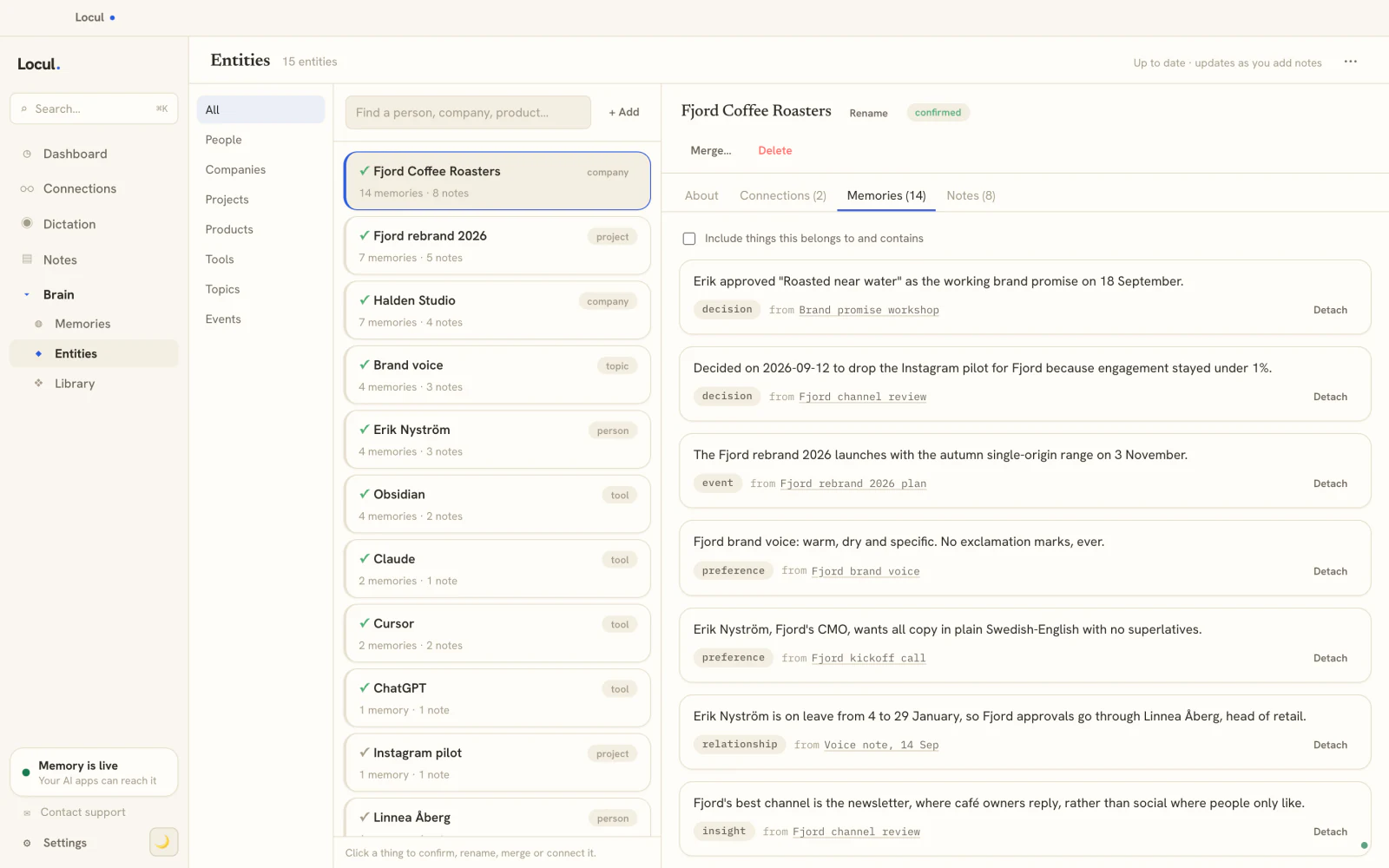
It is passive, so you skip the maintenance job. Locul reads from where your data already lives, local markdown files and PDFs, dictation (through tools like Contextli, Wispr Flow, and Willow Voice), your Notion, and your LinkedIn profile, and distills it into typed memories with confidence scores. You are not importing anything into a vault. When a fact changes, Locul supersedes the old memory and keeps the history, which is the mechanism behind staying current. You still get full editing and viewing of your brain inside the app, exactly like Obsidian, but you are not the one keeping it up to date.
It is also honest about what it knows: when it can only find part of your context, it says so rather than guessing, which is the transparency the quickstart prompt above was reaching for. Because it is local-first and works with open-weight models like Ollama, your data and your models stay on your machine. For the deeper story on making an AI remember you across sessions, how to give your AI a memory that lasts covers the memory model in full. Try Locul: it runs on local or managed AI, and can read Notion plus LinkedIn as live sources.
Frequently asked questions
How do you build a second brain with AI?
Start with a 15-minute brain dump into a folder, sort it into PARA categories (Projects, Areas, Resources, Archives), and have your AI pull out the decisions, facts, and open questions. That proves the idea in 30 minutes. To make it last, move to a setup where the AI files and recalls for you and, ideally, keeps itself current from your real activity so you are not maintaining it by hand.
What is a 2nd brain AI?
It is a context layer your AI reads before it answers, built from your notes, decisions, and work. Unlike a plain note archive that you search by keyword, an AI second brain summarizes, connects, and recalls across everything you have stored, so your AI produces output that matches your facts and your voice instead of generic answers.
What is the 30 percent rule in AI?
It is an informal rule of thumb: AI handles roughly the routine 70 percent of a task, the drafting, tagging, and organizing, while the 30 percent that is judgment, direction, and review stays with you. For a second brain, let the AI do the capture and filing, but stay in the loop to correct what it files. The setups that produce slop are the ones where people accept AI output without that review.
How do you make a second brain with Obsidian and Claude?
Install Obsidian (or use a plain folder), keep your notes as markdown, and point Claude Code at the folder so it can read and write files in plain English. It is a solid, no-lock-in build. Two limits to plan around: you maintain the files by hand, and everything has to live in that one vault, so context in Notion, dictation, email, or your LinkedIn profile is either left out or imported by hand. If that upkeep is the part you want gone, choose a setup that reads across your tools and updates itself.
Is there a free AI second brain setup?
Yes. The no-code quickstart is free with any AI you already pay for, and local-files tools like Obsidian are free for personal use. If you want a self-updating brain, Locul builds it from your own work on local AI, so you can run the setup against real work and judge it on real output. Try Locul.
How long does an AI second brain take to set up?
The quickstart is 30 minutes. A local files build is about an hour to wire up, plus a day or two to sort and ingest your existing notes. A self-updating setup is faster because you are not importing everything by hand: you point it at where your data already lives and it does the distilling. In all cases you have something usable the same day and it improves as you use it.
Where to go from here
The setup itself is not hard. The 30-minute quickstart above gives you a working second brain today. The decision that actually matters is the one every popular guide skips: pick a setup that does not turn you into its maintenance worker. A brain that reads from where your data already lives and keeps itself current is the difference between a system you use in three months and one more junk drawer.
If you want that without babysitting a vault, try Locul and point it at your real work. Judge it the honest way: run the same task with and without it, and see whether the output finally sounds like you.