Claude Code MCP server that remembers your notes
A Claude Code MCP server is a small program that gives Claude Code tools it doesn't have on its own, like reading GitHub, querying a database or recalling your notes. Any server goes in with one command. Add Locul as one, and Claude Code stops asking for context you already wrote down.
Locul runs on Mac (Apple Silicon and Intel) and Windows. Claude Code runs anywhere.
> Write the migration for the new invoices table.
Which ID type do you use, and do invoices need soft delete? Paste your conventions and I'll write it.
$ claude mcp list
locul: locul-node locul-mcp.js - ✓ Connected
> Write the migration for the new invoices table.
locul · recall_memories "invoices table conventions"
Created migrations/0042_create_invoices.sql
id uuid default uuidv7(), amount_cents bigint, deleted_at timestamptz
Used 3 memories from Locul: key type, money format, soft delete.
- Run
claude mcp add --transport http <name> <url>for a hosted server, orclaude mcp add <name> -- <command>for one that runs on your computer. - Add
--scope userto use it in every project. Without a scope flag it only loads in the folder you ran the command in. - Run
claude mcp list, or/mcpinside a session, to confirm it connected.
What a Claude Code MCP server is
An MCP server is a separate program that speaks the Model Context Protocol, the open standard that Claude Code, Anthropic's command-line coding agent, uses to connect outside tools. Each server offers a few named tools. Claude Code reads their names and descriptions, then decides when to call one, the same way it decides to run a shell command or open a file.
Some servers run on your computer and talk to Claude Code over stdio, which means Claude Code starts the program and swaps messages with it directly. Others are hosted, and Claude Code reaches them over HTTP, usually after you sign in once. Locul offers both: a local server that reads your notes from disk, and a hosted connector for machines where Locul isn't installed.
Two ways Claude Code reaches Locul
Anthropic's Claude Code MCP documentation is the reference for every flag below, and the Model Context Protocol site explains the protocol itself. Every command on this page was checked against those docs on 16 October 2026.
How to add an MCP server to Claude Code
Claude Code adds every MCP server with one command, claude mcp add, and the flags change with how the server runs. To add a hosted server, run claude mcp add --transport http <name> <url>. For one that runs on your computer, put its command after two dashes. Then run claude mcp list to confirm it connected. Pick the tab that matches the setup instructions you were given.
For a server with a URL. This is the recommended transport for remote servers.
claude mcp add --transport http notion https://mcp.notion.com/mcpIf the server needs a sign-in, run /mcp inside Claude Code and pick it. Claude Code opens the sign-in page and stores the token for you.
For a server that runs as a local program. Everything after the two dashes is the command Claude Code starts.
claude mcp add --env AIRTABLE_API_KEY=YOUR_KEY --transport stdio airtable -- npx -y airtable-mcp-serverKeep another option between --env and the server name, as above. Otherwise Claude Code reads the name as one more KEY=value pair.
When the setup guide gives you a JSON block, paste it in whole.
claude mcp add-json my-server '{"type":"http","url":"https://mcp.example.com/mcp","headers":{"Authorization":"Bearer YOUR_TOKEN"}}'Already set servers up in Claude Desktop? On macOS and WSL, claude mcp add-from-claude-desktop imports them in one go.
No Claude Code yet?
Anthropic's installer puts the claude command on your computer. Open a new terminal afterwards and run claude --version to check it.
macOS, Linux and WSL
curl -fsSL https://claude.ai/install.sh | bashWindows PowerShell
irm https://claude.ai/install.ps1 | iexLocal, project or user scope
A Claude Code MCP server's scope decides which folders can use it, and a wrong scope is the most common reason a server seems to disappear: it was added with the default scope in a different folder.
| Scope | Flag | Loads in | Shared with your team | Saved in |
|---|---|---|---|---|
| Local (default) | none, or --scope local | The folder you ran the command in | No | ~/.claude.json, under that project |
| Project | --scope project | That project, for everyone who clones it | Yes, through git | .mcp.json in the project root |
| User | --scope user | Every project on your computer | No | ~/.claude.json |
When the same name exists in more than one scope, Claude Code uses the local entry first, then project, then user. Project servers from a .mcp.json ask for your approval the first time, and claude mcp reset-project-choices clears those answers.
- billing-api: locul available
- marketing-site: locul available
- notes-scripts: locul available
.mcp.json in your project root
{
  "mcpServers": {
    "api-server": {
      "type": "http",
      "url": "${API_BASE_URL:-https://api.example.com}/mcp",
      "headers": { "Authorization": "Bearer ${API_KEY}" }
    }
  }
}
A .mcp.json file can read environment variables with ${VAR} or ${VAR:-default}, so you can commit it without committing your keys.
Check it works
Four commands cover almost every Claude Code MCP check. Run them in your terminal, except /mcp, which you type inside a Claude Code session.
Every server and whether it connected.
claude mcp listOne server's details, including its scope and command.
claude mcp get loculInside a session: status, sign-in, reconnect.
/mcpRemoves a server and any sign-in token it stored.
claude mcp remove loculThen ask Claude Code something only the server can answer. "Which Locul tools can you see?" is a good first question.
MCP servers to add to Claude Code first
Most Claude Code setups need three or four MCP servers, not thirty. These come up again and again, each with the command from its maker's own docs. Every server costs a little context and a little trust, so add one when you catch yourself doing its job by hand.
| Server | What it does | Add it |
|---|---|---|
| GitHub MCP Server | Issues, pull requests, Actions and code search | claude mcp add-json github '{"type":"http","url":"https://api.githubcopilot.com/mcp","headers":{"Authorization":"Bearer YOUR_GITHUB_PAT"}}' |
| Context7 | Current, version-specific library docs | claude mcp add --transport http context7 https://mcp.context7.com/mcp |
| Playwright MCP | Drives a real browser to test flows | claude mcp add playwright npx @playwright/mcp@latest |
| Chrome DevTools MCP | Performance traces, console and network | claude mcp add chrome-devtools -- npx -y chrome-devtools-mcp@latest |
| Sentry | Errors and stack traces | claude mcp add --transport http sentry https://mcp.sentry.dev/mcp |
| Linear | Tickets and projects | claude mcp add --transport http linear https://mcp.linear.app/mcp |
| Locul | Memory built from your notes | The Connect button in Locul, or the hosted connector below |
If an add-json command fails in a Windows terminal, run it from Git Bash or WSL, where the single quotes around the JSON work as written.
The official Model Context Protocol servers repository lists the reference servers and links to hundreds more. Our ranked list of MCP servers covers each pick in depth, with what it costs in context and the popular ones you can skip.
On a Hacker News thread about must-add servers for Claude Code, one reply was "Context7 is quite useful for coding", and another user pairs a Brave Search server with the Fetch server for fast web lookups. The same thread has a fair pushback: Claude Code already searches the web and reads pages on its own, which is why the list above stays short.
Only add servers you trust
Anthropic's documentation says to verify you trust each server before you connect it, because servers that fetch outside content can expose you to prompt injection. Take servers from their makers, give each token the narrowest scope that works, and approve a project's .mcp.json servers only when you know what they run.
Troubleshooting
These are the problems people hit most often after running claude mcp add, with the fix for each.
| If you see this | Do this |
|---|---|
| The server shows in one project but not another. | It was added at local scope. Remove it and add it again with --scope user. |
| Claude Code times out while the server starts. | Slow servers need longer. Start Claude Code with MCP_TIMEOUT=10000 claude to allow ten seconds. |
| A tool result gets cut off or saved to a file. | Claude Code warns above 10,000 tokens of tool output and caps it at 25,000 by default. Raise the cap with MAX_MCP_OUTPUT_TOKENS=50000. |
| You worry ten servers will eat your context. | Claude Code's tool search is on by default, so only tool names load at the start and full definitions load when needed. |
| Claude Code never calls the server's tools. | Ask for it by name, for example "use context7 for this", or add one line to CLAUDE.md that says when to use the server. Locul offers to add that line for you when you connect it. |
| Locul's tools reply that you need a trial. | Your Locul account has no active plan yet. Start one from the pricing page and ask again. |
| You changed Locul's AI access settings and Claude Code still behaves the old way. | Quit Claude Code and start it again. The Locul server reads those settings when it starts. |
| Locul says Claude Code isn't installed, but it is. | Open a new terminal and run claude --version. If that fails, add Claude Code to your PATH, or use Manual setup in Locul and paste the command it shows. |
Add Locul to Claude Code
Locul is a desktop app for Mac and Windows that turns your markdown notes, PDFs and dictations into memories your AI apps can recall, and keeps them current as your work changes. It connects to Claude Code as an MCP server called locul.
- Install Locul and let it index your home folder. It reads markdown files, and saves a .md copy next to each PDF so those get read too. New notes are picked up while the app runs.
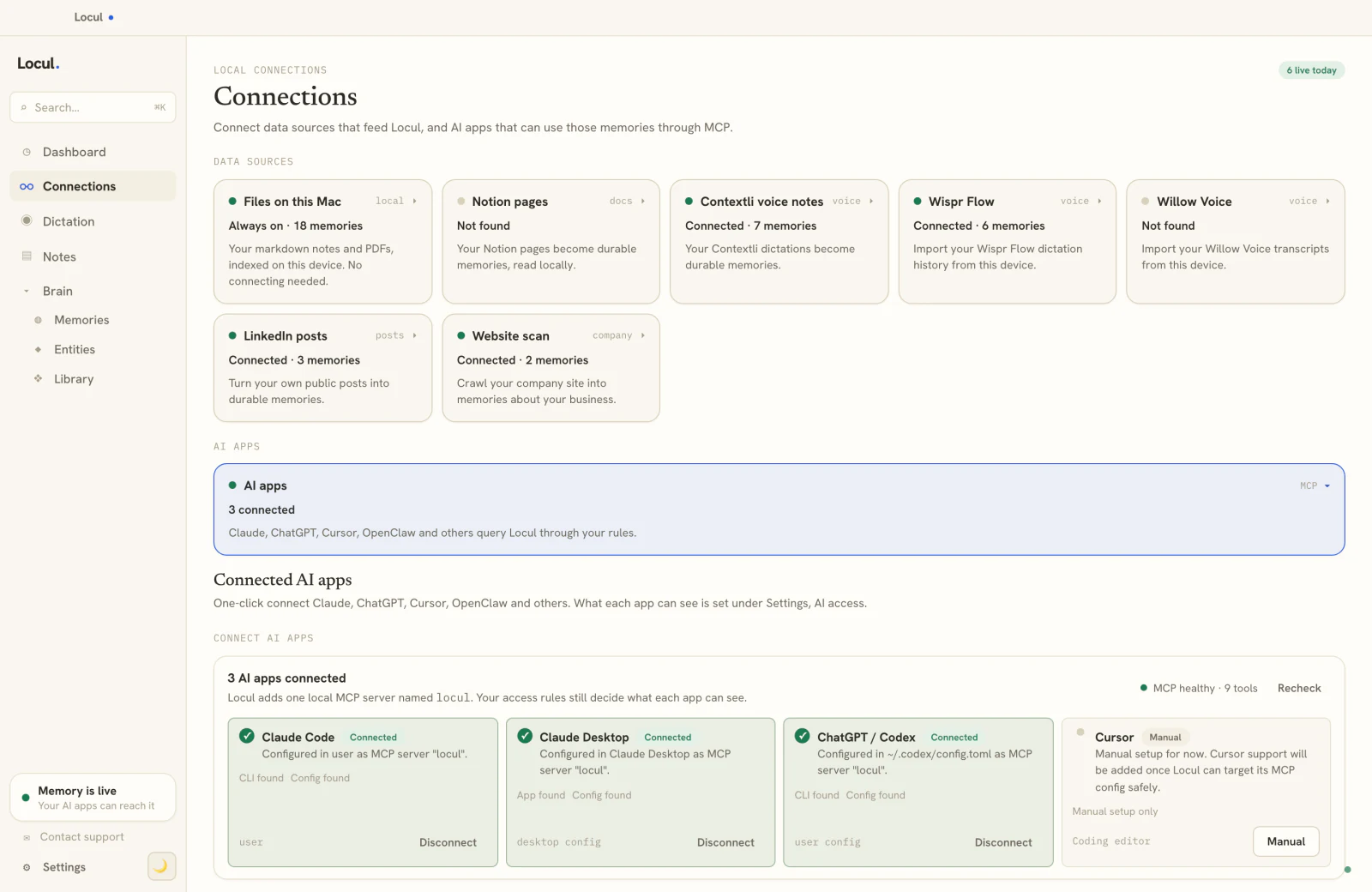
- Open Connections in Locul and click Connect on the Claude Code card. Locul runs
claude mcp addfor you at user scope, so every project can use it. It then offers to add a short block to~/.claude/CLAUDE.mdthat tells Claude Code when to check your memory. You can say no.This is the shape of what Locul runs. The app fills in the real paths, so you never type it:
claude mcp add locul --scope user \ -e LOCUL_HOME=<your home folder>/.locul \ -- <path to locul-node> <path to locul-mcp.js> - Check it. Run
claude mcp listand look for locul, then ask: "What do my notes say about the billing API?"
Where your notes go
Locul reads your notes on your own computer, straight from the files. By default, Locul's AI builds memories from them on Locul's servers and backs those memories up to your Locul account. If you'd rather your notes didn't go to Locul's servers, switch to Local-only mode and choose a local model such as Ollama as the AI engine. Either way, whatever Claude Code reads goes to Anthropic, as with any file Claude Code opens.
No Locul on this machine?
On a work laptop or a remote box, add the hosted connector instead and sign in once. It reaches the memories your Locul account holds, not the files on another computer.
claude mcp add --transport http locul https://team-api.locul.ai/mcpThen run /mcp in Claude Code and pick locul to sign in. The cloud connector page lists its tools. If you already added Locul as a connector on claude.ai, Claude Code picks it up when you sign in with the same claude.ai account.
Locul doesn't need to be open for Claude Code to use it. Claude Code starts Locul's server on its own. Locul does need to run to learn from notes you write after that.
CLAUDE.md or a memory server?
Claude Code already has memory of a kind. It reads CLAUDE.md files at the start of every session, from your project and from ~/.claude. For a repo's build commands and code style, that's the right place, and Locul's free CLAUDE.md analyzer checks one for conflicting rules.
A CLAUDE.md file stops working well when the context isn't about one repo. The decision you made in a meeting, the customer who asked for a feature, the reason you dropped a library last spring: those live in your notes, and copying them into every CLAUDE.md is how the file grows until Claude Code starts ignoring parts of it.
| CLAUDE.md | Locul over MCP | |
|---|---|---|
| What it holds | Rules and commands you write for one repo or for all of them | Memories built from your notes, PDFs and dictations |
| Who keeps it current | You, by hand | Locul, as your notes change. The old version is kept, marked as replaced |
| When Claude Code reads it | All of it, at the start of every session | Only the memories a task needs, when it asks |
| Reaches notes outside the repo | No | Yes, anywhere in your home folder |
| Works in Claude Desktop, Codex and Cursor | No. Codex reads AGENTS.md and Cursor reads its own rules files | Yes, the same memory |
| Cost | Free | A Locul plan, after a 7-day trial |
You don't have to choose. Keep a short CLAUDE.md for the repo, and let memory hold everything else.
new Claude Code session · ~/notifications-service
> Scaffold the notifications service.
locul · recall_memories "internal service calls"
Set up a tRPC router, not REST, per your Tuesday dictation.
What Claude Code can do with your notes
Claude Code gets tools for searching, recalling and saving. A few of them, with the question each one answers:
No tool edits or deletes the notes you already have. Claude Code can save a new note and add or correct memories, and every change shows in Locul.
Runs on open models on servers in your region or on your premises.
recall_memories"What did we decide about the invoices table?"search_notes"Find my notes that mention the Stripe webhook."read_note"Open the architecture note and follow it."get_entity_profile"Tell me everything about the Acme account."get_memory_source"Where did that fact come from?"create_memory"Remember that we deploy on Thursdays."
Watch it first
Questions people ask
What is a Claude Code MCP server?
A Claude Code MCP server is a program that adds tools to Claude Code through the Model Context Protocol, the open standard Anthropic created for connecting AI apps to outside tools. A server can run on your computer, where Claude Code starts it and talks to it over stdio, or it can be hosted at a URL that Claude Code reaches over HTTP. Once a server is added, Claude Code sees its tool names and calls them when a task needs them, for example to read a GitHub issue or recall a decision from your notes.
How do I add an MCP server to Claude Code?
Run claude mcp add in your terminal. For a hosted server, use claude mcp add --transport http <name> <url>. For one that runs locally, put the command after two dashes: claude mcp add <name> -- <command> [args]. Add --scope user if you want it in every project. Then run claude mcp list to confirm it connected, or /mcp inside a session to sign in.
Where does Claude Code store MCP servers?
Local and user scope servers are saved in ~/.claude.json in your home folder. Project scope servers go in a .mcp.json file at the root of the project, which you can commit so your team gets the same servers. You can edit either file by hand, but claude mcp add and claude mcp remove keep the format right.
What's the difference between local, project and user scope?
Local scope, the default, loads a server only in the folder where you added it. Project scope saves it to .mcp.json and shares it with everyone who uses the repo. User scope loads it in every project on your computer. If one name is set in several scopes, local wins over project, and project wins over user.
What are the best MCP servers for Claude Code?
For coding work, start with the GitHub MCP Server for issues and pull requests, Context7 for current library docs and Playwright for anything in a browser. Add Sentry or Linear if you work from errors or tickets. A memory server such as Locul covers the context that lives outside your code. The table above has the command for each, and our ranked list of MCP servers explains the trade-offs.
Can I use more than one MCP server in Claude Code at once?
Yes. Claude Code loads every server you've added for the folder you're in, and they all work in the same session. Tool search is on by default, so only tool names and server instructions load at the start, and the full definitions load when Claude Code needs them. That keeps ten servers from crowding your context. Run claude mcp list to see which ones are active in the current folder.
Can I build my own MCP server for Claude Code?
Yes. An MCP server is a program that answers the Model Context Protocol over stdio or HTTP, and the official SDKs listed on the Model Context Protocol site cover TypeScript, Python and other languages. Once it runs, add it like any other server with claude mcp add. Claude Code can also act as an MCP server itself: claude mcp serve exposes its own tools to another MCP client.
Does Claude Code have memory?
It has CLAUDE.md files, which it reads at the start of every session, and you can edit them with /memory. They hold what you write in them and nothing else. A memory MCP server such as Locul adds memories built from your own notes, kept current as they change, and Claude Code pulls in only the ones a task needs. How Claude Code memory works covers the built-in side in detail.
Does Locul need to be open for Claude Code to use it?
Locul doesn't need to be open for Claude Code to use it. Claude Code starts Locul's MCP server itself whenever it needs it, and the server reads the memories Locul has already built. Keep the Locul app running if you want it to learn from new notes as you write them. On a machine without Locul, the hosted connector works with nothing installed.
Can Claude Code edit or delete my notes through Locul?
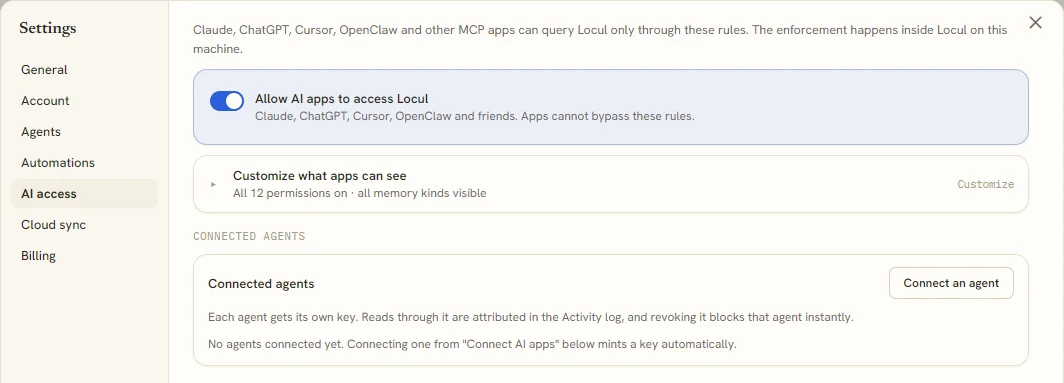
Claude Code can't edit or delete the notes you already have through Locul. It can create a new note, which never overwrites an existing file, and it can save, correct or forget memories, which are separate from your files. In Locul's AI access settings you can turn access off, switch some tools off and mark private folders.
Does the Locul MCP server work on Windows?
Yes, the Locul MCP server works on Windows, and on Mac with Apple Silicon or Intel. The Connect button works the same on both. There's no Linux version of the app yet. On Linux, or anywhere Locul isn't installed, use the hosted connector with claude mcp add --transport http.
Is Locul free?
Locul doesn't have a free plan for new accounts, but every plan starts with a 7-day free trial. The Claude Code connection is part of every plan, and Locul's tools answer once your trial or plan is active. The pricing page shows what each plan includes.

Local-first AI Specialist
I work with Claude and ChatGPT across eight products every day, and most of what breaks is memory: context that does not carry between tools, data too messy to trust, and privacy trade-offs nobody chose. These articles cover what a memory layer has to capture, how to keep it current, and how to run it locally.